Sometimes you hear about people who are always invited to events but never host any themselves. Similarly, some people don’t respond to communications or Xmas cards; and it’s not uncommon for presents sent to growing child relatives to remain unacknowledged or thanked for. In all such situations the giver begins to feel a little aggrieved with the situation, but perhaps feels it inappropriate to raise the matter directly with the individual concerned. To assist all those in such circumstances, it might help if there was an unobtrusive but clear way of signifying dissatisfaction. Perhaps a code could be attached to the bottom of an address or invitation in the same vein as SWALK (sealed with a loving kiss). I suggest NORNOMOT (pronounced nora-no-mo) standing for No Reciprocity (or Response) No More Of This. Maybe the greeting card manufacturers could create special NORNOMOT cards which include pictures of a Last Chance Saloon.
Author Archives: admin
Hikes through the preservation hinterland
I’ve just finished dealing with two particular digital preservation challenges that exist within the document collection I’m currently working on. The first involved two Lotus Notes files; and the second concerned some Windows Help files. My experience with these issues illustrates a) how just a few files can take a lot of work to resolve, and b) that there’s often an answer out there to seemingly impossible preservation problems provide you are prepared to look diligently enough.
I really didn’t believe I was going to find a way to unlock the Lotus Notes files since Notes is a major and very expensive piece of software that I don’t possess; and, in any case, it applies sophisticated time-limited password and encryption controls for its use. Despite being aware of these issues, I thought I’d take a quick look on the net to see if I could find any relevant advice. It was time well spent; I discovered that it’s possible to download a local evaluation copy of Notes for 90 days, and that, because it doesn’t run on a server, this sometimes enables old Lotus Notes files to be opened. I duly downloaded the software and installed it; and then, regardless of the mysteries of Notes access controls, had access to the whole of one of the files (which contained conference-type material) and to parts of the other (which contained sent messages). I still had the username and expired password from the time the files were created and I think this may have helped to access the latter – though I’m not sure about that. Anyway, in both cases, I was able to print out the material to PDF files. I had to manually reorder the conference-type material and to reinstate a few hundred links in it, but that was it – job done!
The Windows Help files were a lot more demanding. Microsoft stopped supporting the WinHelp system (.HLP files) in 2006 in favour of its replacement, Compiled HTML Help (.CHM files). Although Microsoft did issue a WinHelp viewer for Windows 7 in 2009, WinHelp is essentially an obsolete format – it isn’t supported in Windows 10. I’m still running a Windows 7 system so am still able to view the HLP files – but they had to be converted now if they are ever to be accessed again in the future.
There is much material on the net about how to convert HLP files into CHM files, but, as someone with no knowledge at all about how files in either of these systems are constructed, I didn’t find it easy to understand. I soon realised that converting from one to the other was going to be a challenge. However, I did eventually find a web site which offered clear practical advice which I could follow (http://www.help-info.de/en/Help_Info_WinHelp/hw_converting.htm), and I duly downloaded the recommended HLP decompiler; and the Microsoft HTML Help Workshop software. The process to be followed went something like this:
- Decompile the HLP file into its component parts (consisting of a help project file with the extension .hpj, along with one or more .rtf documents, an optional .cnt contents file, and any image files – .bmp, .wmf, or .shg – that are used within the Help file).
- Convert the various HLP files into HTML Help files using a wizard in the HTML Help Workshop tool (the new files consist of a project file with the extension .hhp, one or more HTML files, a .hhc contents file, an optional .hhk index file, and any image files that are used within the Help file).
- Set parameters in the hhp file to specify a standard Window name and size; and to have a search capability created when the files are compiled into a single CHM file.
- Reconstruct the Table of Contents using the original HLP file as a guide (in many cases no Table of Contents information comes through the conversion process – and, even when some did, it had lost its numbering). Where the contents had to be created from scratch, each new content item created had to be linked to the specific HTML file to be displayed when that content item is selected.
- Re-insert spacings in headings: The conversion process also loses the spacing in headings in the base material resulting in headings that look like this, ‘9.1Revised System’ instead of like this ‘9.1 Revised System’. To rectify this problem, the spacings have to be manually re-inserted into each HTML file of base material.
- Compile the revised files into a single CHM file.
The first HLP file I tried this out on contained just a single Help document with some 130 pages. It took a bit of figuring out, but I eventually got the hang of it. However, the second HLP item was in fact made up of 86 separate HLP files all stitched together to present a unified Table of Contents in a single window in which the base material was also displayed. Many of these 86 separate files had 50 or more pages, and some had many more than that; and each page had to represented separately in the Table of Contents. It was a very long tortuous job converting all 86 HLP files and ensuring that each one had a correct Table of Contents (I didn’t attempt to re-introduce the spacing in the headings – that would have been a torture too far). However, that was not the end of it; the files then had to be stitched together in a single overall file that combined all the individual Tables of Content and that displayed all the base material. This involved inserting a heading for each document, in the master file; and inserting a linking command to call up the Table of Contents for that particular document. Oh, and I should also mention that the HTML Help File Workshop software was very prone to crashing – not a little irritating – I soon learnt to save regularly…..
This overall task must have taken at least 30 or 40 hours – but I did get there in the end. The new CHM file works fine and is perfectly usable, despite three of the documents being displayed in separate windows instead of the single main window (although I spent some time on this issue I was unable to eliminate the problem). Of course, the lack of spacing in the headers is immediately noticeable – but that’s just cosmetics!
No doubt there are specialists out there who would have made a quicker and better job of these conversion activities. However, if you can’t find such people or you haven’t got the money to throw at them, the experiences recounted above show that, with the help of the net, it’s worth having a go yourself at what you may consider to be your most difficult digital preservation challenges.
The Minimiser
I’ve been reading an increasing number of reports about how much time people are spending on their mobiles and of the many negative effects of such usage. Perhaps it’s time, therefore, for the emergence of a new breed of app explicitly designed to minimise one’s usage of the mobile. It would be capable of taking a whole variety of steps to reduce the amount of email you get; to summarise incoming communications for you; and to ask searching questions of you about new apps you want to load and new contacts you want to add. It would measure and report your usage of the mobile, and advise on ways that you can cut down the amount of time you are spending on it or reorganise your usage patterns so as to improve your quality of life.
Binding Sounds – Part 2
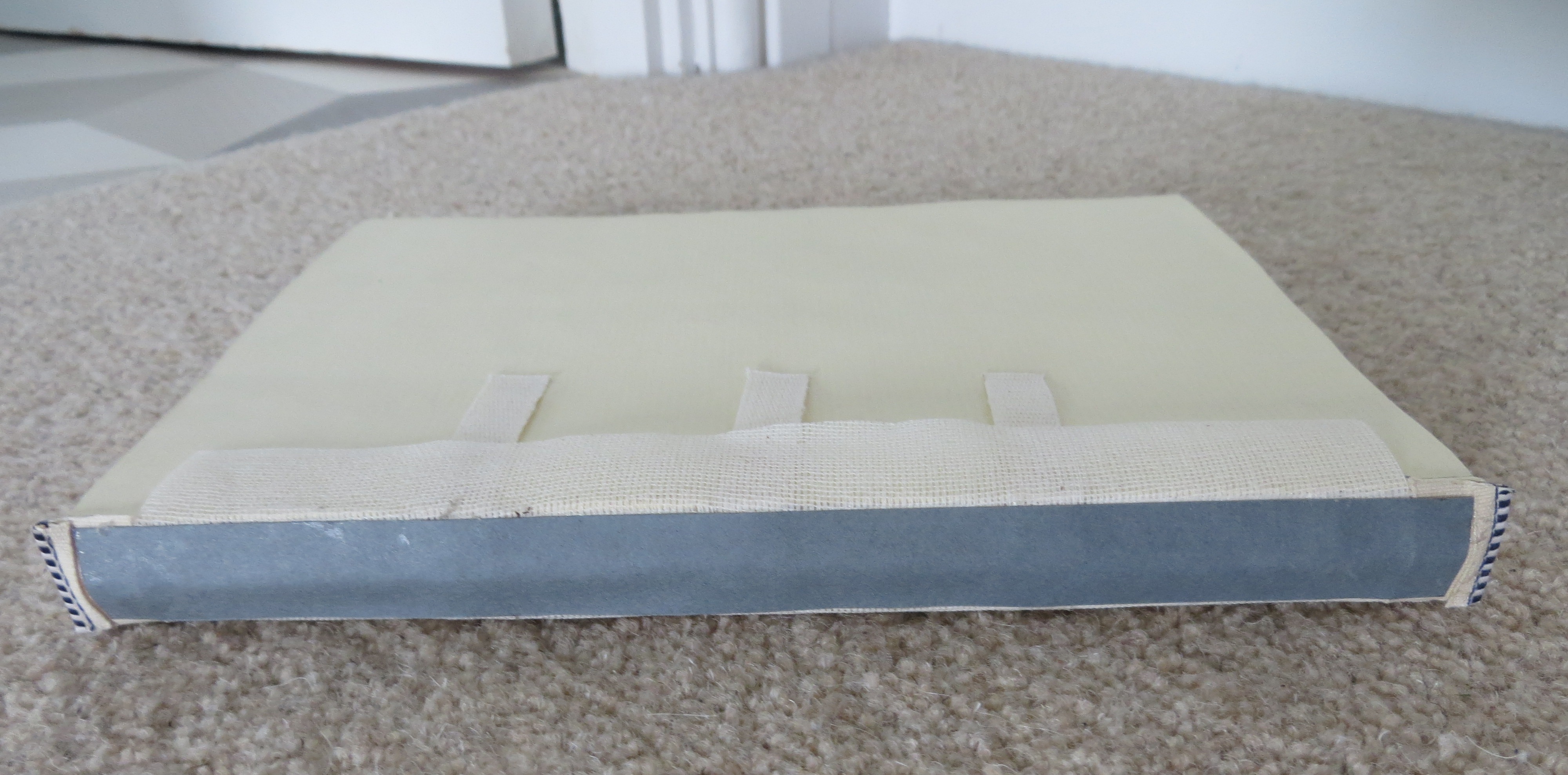
When I last wrote about creating the Sounds for Alexa book, I’d finished sewing the text block. The next step was to glue the mull (thin gauze) to the spine, then to glue some Kraft paper on down the spine on top of the mull, and finally to glue the blue and white end bands, as shown below.
Next, the colourful end papers I had selected were folded in two and glued with a thin, 3mm wide, line of PVA to the inside of the text block – one at the front and one at the back. Cardboard was then cut to the size of the text block plus a 4mm overlap all the way round, and glued to the mull and the tapes as shown in the picture below.
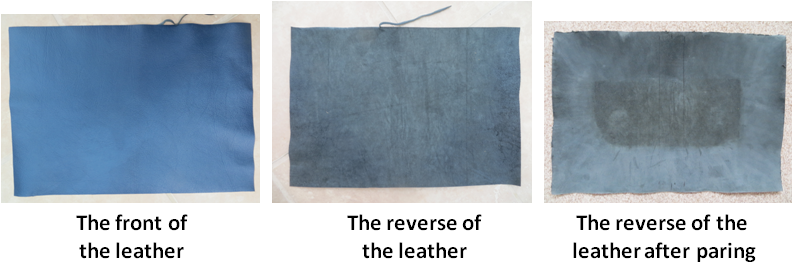
I’d elected to have a leather cover (as opposed to cloth) which is longer lasting and has a more luxurious appearance (see the picture below). However, the downside of leather is that it is thicker and less pliable and so it produces unsightly bulges when it is turned over the edges of the cardboard frame, and noticeable ridges at its edges. To solve this problem, the leather is pared down to a much reduced thickness at the points where it is to be turned and along its edges – in effect all but the central area as shown in the picture below .
Paring leather is a task easier said than done. Doing it manually involves using a very sharp blade and shaving off thin layers over and over again until the requisite thinness is achieved. This is a very messy process which produces lots of small fragments of leather which get everywhere. It took me a couple of hours to complete the task and the particular tool I was using caused me to lose the feeling in my thumbs and forefingers. No doubt it gets easier as one becomes more proficient, however, if I ever use leather again, I shall be investigating using a Paring Service which I’m told can be hired to do the same job much faster and to a better quality than I could hope to achieve, by using machines.
Once the paring was done, the leather was glued to the cardboard frame, the end papers were stuck down to the front and back boards, and the dust jacket was printed and cut to size and folded around the book. Finally a protective plastic cover was fitted to the dust jacket. The completed book is shown below.
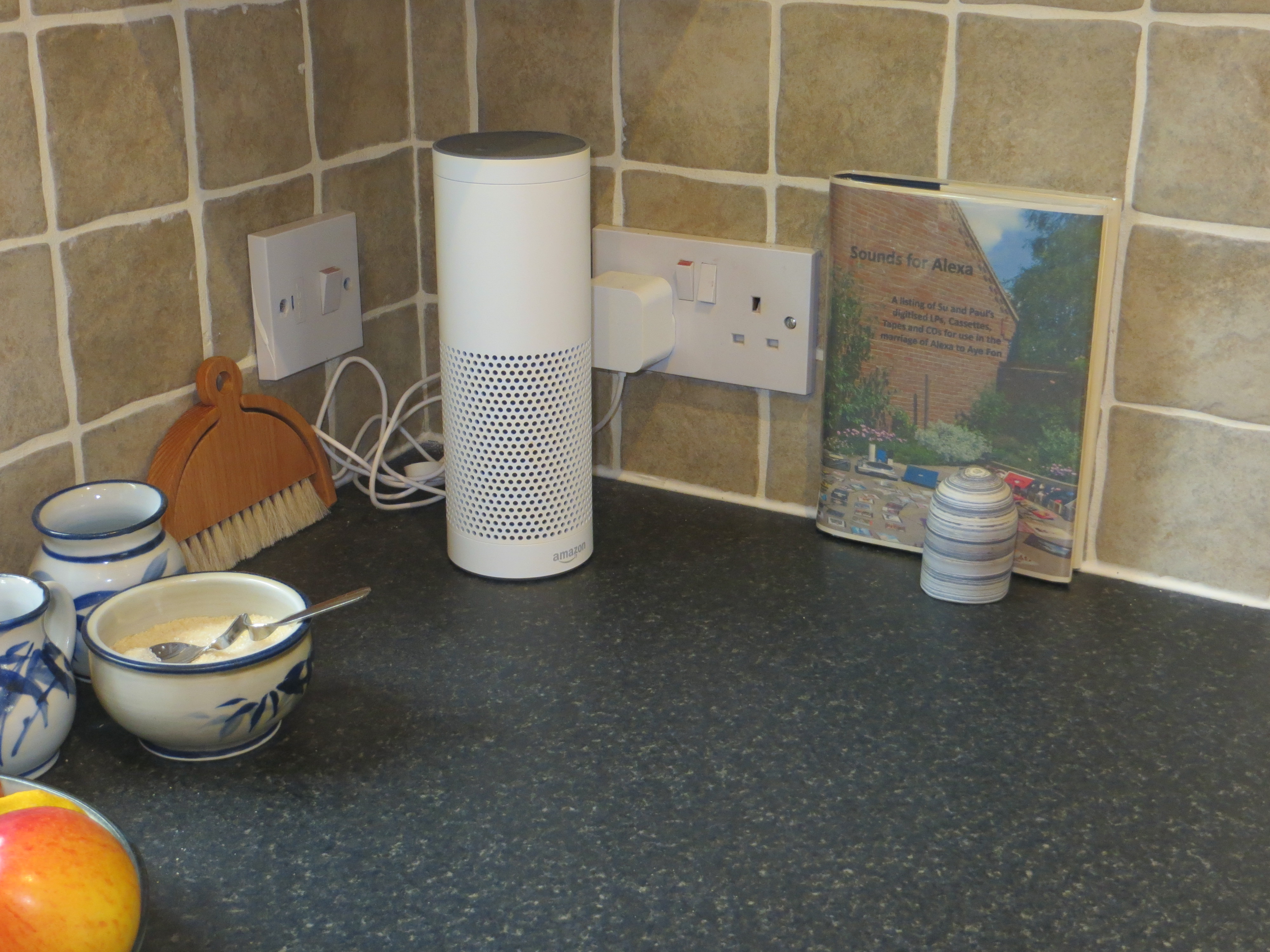
Sounds for Alexa has now taken its place next to Alexa in our kitchen diner, as shown in the picture below. We will see whether it gets put to use as originally envisaged over the coming months.
U6.4 A summary view of the OFC future
Taking all the material from Units 6.1-6.3 into account, it looks like there will be a period of steady evolution before we start to encounter AI entities with the ability to do things autonomously. During this evolutionary period, the main individual applications that we use will become increasingly sophisticated and central to our lives; and we will make increasing use of applications and internet services which embed a degree of AI expertise and the ability to learn, and we will start to think they are normal and very useful. The amount of digital material we possess will continue to grow. It will become increasingly important to make arrangements for our digital accounts and possessions to be managed after we die. More and more physical objects will contain chips which we can interrogate and control through our computer systems. We will grow used to interacting with our computer systems by voice as well as by keyboard; and we will probably start to get used to virtual reality experiences.
At some point, the computer manufacturers will produce products in which our primary interaction with the system will be via a single AI entity. This will seem normal given what we have experienced before. The AI entity will take care of all maintenance, including backups, and will ensure that our files are always accessible and readable. As the AI entity becomes more knowledgeable, it will start to do more and more for us and we will have to provide less and less detailed instructions. The AI may start to see what we show it and know what it is looking at. There may be other AI in the house in other computers or in robots, and we will be able to interconnect them and instruct them to cooperate. While the digital world will increasingly be taken care of by our AI, we may start to value some of our physical possessions even more.
I can’t say I’m particularly confident that this vision of the future is what it will actually be like. Nor am I sure that it is of any particular relevance to any OFC project you are about to embark on. However, it was interesting to think through where things might be going. If there was any conclusion I would come to from this examination, it is that our digital world is going to be fully taken care of by an increasingly autonomous AI; and that, in the face of this, we should take increasing care of our precious physical possessions as they are the only things that are going to be truly under our control.
This is the last Unit in this OFC Online Tutorial.
U6.3 The future impact of AI
Artificial Intelligence (AI) is a term used to signify intelligent behaviour by machines – which really just means them doing more complex things than they have done before. Two significant milestones in the development of AI were when IBM’s Deep Thought programme beat Garry Kasparov, a reigning world chess champion, in 1997; and in 2016 when Google’s DeepMind AlphaGo programme beat a professional Go player. Current prominent AI work includes the development of driverless cars and trucks, and improving the ability of AI programmes to learn for themselves. It is generally thought that AI capabilities will continue to be developed for some time in just narrow areas of application, before eventually broadening their scope to become more general-purpose intelligent entities. Assuming this development trajectory, we can speculate that the way we deal with our digital objects and collections might be impacted by AI in the following series of steps, each one taking greater advantage of an increasingly capable technology:
A. AI to collect virtual objects at our specific request: The Facebook ‘on this day’ function that we can choose to turn on or off, is a good example of this in use in a contemporary system. In future systems we might imagine that we have an AI which is independent of any one system but which we could ask to collect specific objects across the systems we specify, for example, ‘collect all photos that we look at in our email, in Facebook and on Instagram’.
B. AI to collect digital objects at our general instruction: This is similar to step A except that we won’t have to specify the systems we want it to monitor. We‘ll just provide a blanket instruction such as ‘collect everything to do with any shopping I do’, or ‘collect all photos I look at’, and the AI will address the request across all the systems we use. At this stage the AI should also be taking care of all our backup requirements.
C. AI to understand what it sees in the digital objects: If we have asked the AI to collect objects for us, in this step it will be capable of fully understanding the content of the objects, and of having a conversation about what they are and the connections between them. At this point there will be no need for indexes to digital collections since the AI will know everything about the objects anyway; it will be able to sort and organise digital files and to retrieve anything we ask it for. The AI will also be handling all our digital preservation issues – it will just do any conversions that are necessary in the background to ensure that files are always readable.
D. AI to exploit our digital objects for us at our request: Now that the AI has control of all our objects and understands what they are, we may just be able to say things like, ‘assemble a book of photos of the whole of our family line and include whatever text you can find about each family member and have three copies printed and sent to me’.
E. Eventually we leave it all to AI and do nothing with digital objects ourselves: By this stage the AI will know what we like and don’t like and will be doing all our collecting and exploiting for us. We’ll just become consumers demanding general services and either complimenting or criticising the AI on what it does.
The last stage above reflects one of the possible futures described by Yuval Harari in his book ‘Homo Deus’ in which AI comes to know us better than we do ourselves, since it will fully understand the absolute state of the knowledge we have and be able to discount temporary influences such as having a bad day or some slanted political advertising. This clearly represents a rather extreme possible situation many decades hence; nevertheless, given what we know has happened to date, we would be foolish to discount either the rate or the content of possible development. However, we should also remain absolutely clear that it will be us, as individuals, that are deciding whether or not to take up each of the steps described above.
Throughout this period of the rise of AI, we will still be dealing with our physical world and our physical objects. AI may be able to see the physical world through lenses (it’s eyes), and be able to understand what it is seeing, and we may well get the AI to help us manage our physical objects in various ways. However, it won’t be able to physically manipulate our objects unless we introduce AI-imbued machines (robots for want of a better word). This too is a distinct possibility – especially since we are used to having machines in our houses (we’ve already made a start with robot vacuum cleaners and lawn mowers). However, having tried to think through the various stages that we would go through with using robots, I came to a bit of a brick wall. I found it very hard to envisage robots rooting round our cupboards, putting papers into folders, and climbing into the loft. It just seems unrealistic unless it was a fully fledged, super-intelligent, human-type robot – and that in itself brings with it all sorts of other practical and ethical questions which I’m not equipped to even speculate about. Perhaps all that can be said with any certainty about such a future of AI software and robots, is that humans will take advantage of whatever technology is on offer provided it suits them and they can afford it.
U6.2 The future impact of recent developments
A number of recent or ongoing developments give an indication of what technologies we might be using in the future to create, use, and exploit our digital objects. They are described below. The various dates quoted are taken from the internet’s Wikipedia.
GPS position data in photo tags: It has now become a standard camera feature to include location data in the metadata tag of every photo taken, by using GPS position data. The tags also include full details about the camera, the settings used, and of course the date. All this data is acquired automatically and placed in metadata tags which are mostly hidden unless specifically looked at.
Impact on OFC projects: Systems will increasingly use all available information and data sources to build up a set of knowledge about each digital object. These other sources may include calendar systems, emails, texts, social media and the internet.
Music recognition: Shazam and other internet services identify music, movies, advertising, and television shows, based on a short sample played through the microphone on the device being used to run the relevant application. Shazam first started operating in 2002 and this kind of functionality is now well known and widely used. iPhone 8 users can ask Siri, its virtual agent, to identify what music is playing and it will provide the answer after interacting with Shazam in the background.
Impact on OFC projects: See Image Recognition below
Face recognition: Google’s Picasa programme was one of the first photo management applications to offer a face recognition capability in 2008. Since then, the function has become a commonplace feature provided in a host of applications and mobile phone apps. Not only can you search for a face within a set of photos, but also across the whole internet.
Impact on OFC projects: See Image Recognition below
Image recognition: Google’s image search capability was amazing when it first came out in 2001; but was even more astounding when a reverse image search function was added in 2011 which searched for images similar to one uploaded or specified. Nowadays, it is a heavily used function which most Google users are familiar with.
Impact on OFC projects: The ability of computers to recognise music, faces, objects – anything – will become increasingly sophisticated and accurate. It will develop from just being able to find similar things, to understanding what particular things are in the same way that we can recognise a piece of music as being classical, or a face being European, or a particular animal being a cat. Future software that manages digital objects will also have an understanding of what those objects are.
RFID: The cheaper RFID (Radio Frequency Identification) systems for tracking objects can be purchased for less than £400 and they will continue to drop in price. The cost of the tags that are attached to the objects you want to monitor are a few pence each.
Impact on OFC projects: See Smart Home Devices below
Smart home devices: There is a growing market for systems to control a wide variety of home devices including heating, lighting, sound systems and security. This is currently the most prominent aspect of a general idea referred to as the Internet of Things (IoT) in which communicating chips are built into products to assist their manufacture, use and maintenance.
Impact on OFC projects: Many of the physical possessions we obtain in the future will include a chip which contains information about the object and which can communicate with parent apps. We will become familiar with controlling objects in this way and with using the parent apps. We will attach our own RFID tags to our important possessions that are not already chipped, so that we can keep track of them within the same control systems.
Facebook’s ‘on this day’ function: Facebook provides its users with the option of being regularly presented with historical posts from the same date some years ago. These remind people of what they were thinking and doing, and who they were interacting with, in the past; and reawakens their memory of those events.
Impact on OFC projects: This sort of feature will be incorporated in many systems that accumulate user’s digital objects. Users who like it will come to regard it as a primary source of prompts for their memories. As the collections of objects grow over time, they will become increasingly valuable to individuals. Users will also become accustomed to not having to put any effort into saving material because the systems will do that for them.
The culture of sharing and being public: Today, a great many people want to upload, share objects, and get likes. There is less interest in private reflections, diaries and private photo collections.
Impact on OFC projects: People will increasingly want to share the broad range of digital objects (i.e more than just photos) in their collections with others. Systems will continue to be developed to enable them to do so. Perhaps families will possess their own virtual spaces to curate their own history.
The emergence of Virtual Reality: Virtual Reality (VR) has been under development for over 30 years but has still not become mainstream technology. However, several of the major technology companies including Samsung and Facebook, have products; and some use is being made of it in computer gaming. The industry is searching for a killer application – something like 360 degree videos, for example, or augmented reality in which virtual objects are superimposed on a picture of the real world. In the meantime, however, there is a continuing belief that the technology will eventually be widespread.
Impact on OFC projects: VR could eventually provide a controlled access exhibition space in which to manage and display all your digital objects.
Voice interaction: Voice recognition products emerged in the 1980s and have been getting better and better ever since. However, in recent years, three different personal assistant-type technologies which use voice as their primary interface with the user, have become widespread: Apple’s Siri, Microsoft’s Cortana, and, more recently, Amazon’s Alexa; and it is these three that are familiarising the majority of ordinary users with the idea of using voice as a primary interface to their mobile phones and their computers. Alexa is being used initially as an interface to Amazon’s Echo device which accesses Amazon’s huge music library and the internet. The ability to stand in one’s kitchen and suddenly desire to hear a particular piece of music and to say, for example, ‘Alexa, play the album No Secrets by Carly Simon’ and to have it start playing 5 seconds later, is amazing, and is indicative of how easy it will be in the future to pull up any of our digital objects including photos and mementos.
Impact on OFC projects: The capabilities of the voice interface will continue to improve until it becomes as reliable as normal conversation. A considerable amount of computer interaction currently performed using keyboards will migrate to voice. Users will become used to the idea of asking the computer for information and answers, and having the computer respond with what they want.
U6.1 The future of OFC items and collections
OFC is a general technique for organising all sorts of things – in fact almost any sort of thing – but mostly things that belong to individuals in their own houses. A significant change that has occurred to the physical things in people’s houses over the last 70 years is that they have increased enormously in quantity. We are in an era of constant economic growth, supported by rampant consumerism; we accumulate a lot more things and we don’t use those things for as long as we used to. Consequently, often the reason people start an OFC-type sort out is simply that they have accumulated too much stuff. Alternatively, they turn to the self storage services which rent out self-contained rooms in a building into which customers can put anything and can access as and when they please. Such services are now widespread. This consumer-driven overload of personal possessions is unlikely to change very much in the future unless a cataclysmic event occurs such as economic collapse, war, or natural disaster due to climate change.
Within the general growth in possessions, there are some areas in which technology has resulted in some shrinkage. Perhaps the best example is the replacement of many (but not all) LPs and CDs by digital MP3 music files. Another is a reduction in paper telephone directories, newspapers, magazines, instruction books and manuals. Books are vulnerable – though sales appear to be holding up at present. Conversely, there is one emerging technology that could actually start to increase the number of physical possessions we have – 3D printing. This is a long way off being cheap enough and useful enough – perhaps fifteen years or more. Nevertheless, if some significant consumer uses for the technology emerged, this could become as common as ordinary printing is today.
Turning to digital objects, we only started to accumulate these about thirty years ago, and for such items we are still on an upward growth path. Emails, texts, Facebook entries, photos – these are some of the digital items which are now an integral part of people’s lives, and we continue to acquire more and more of them every year. In the areas of general household transactions – finance, purchasing, insurance, transport, holidays etc. – more and more is being done electronically and more and more digital objects are being produced to support the transactions. Of course, we have the option to discard some if we want to, but the overall trajectory is still upwards because a) we are still in the process of moving transactions into the electronic environment, and b) the technology gives us little reason to clear things out; in today’s systems, digital storage is plentiful and cheap and there is no impact on physical space whether you have a small number of electronic files or a huge number of them – in both cases they are essentially invisible.
For the collections we start deliberately as hobbies (stamps, books, Clarice Cliff ceramics, firemen’s helmets etc.), there is unlikely to be any downturn. With any luck, humans will continue to be fascinated by the challenge of finding and assembling collections of particular types of physical objects for a long time to come (something which is more difficult to forecast is whether people will start to collect particular types of digital objects as a hobby). For today’s physical hobby collections, there are already many digital services and apps which provide auxiliary support, and it is easy to see these increasing in number and sophistication. The hobby collection of the future is likely to be a hybrid with the digital objects being 3D spin photos, fully indexed, displayed in a virtual exhibition space with access controls enabling the owner to allow specific individuals or the general public to view part or all of the collection. Perhaps virtual exhibitions of contributions from individual collectors will be curated and made available on the net. Perhaps such things already take place…..
Of course, unless specified otherwise, we usually assume that an object is authentic and original. This is not always the case with physical objects; and it is probably even easier to fake digital objects. We have long had problems with movies misrepresenting historical fact ‘for the sake of the story’; and today we are having problems with fake news on the net. In the future, we will need to become more cautious about authentication, and more honest and diligent in the declaration of fictions.
When it comes to inheriting things from our deceased relatives, physical objects are relatively straightforward to deal with even though there are now greater quantities to sort out. Digital objects, however, are much more problematic. It could take an awful long time to get to grips with somebody else’s computer files, and there is less incentive to actually do so since the system is probably not taking up a great deal of physical space. Furthermore, many of the files will probably be in some service in the cloud, each of which will require effort to access and comprehend. Having said that, some services such as facebook enable you to specify a ‘legacy contact’ who will manage your memorialised account after you die. Other net services offer to store account information and passwords for you and to pass them to whoever you specify when you die. As the digital environment becomes increasingly central to people’s lives, the use of such services and the inclusion of stipulations in wills about digital content, will become increasingly prevalent and important. However, even if you have been given all the information about someone’s accounts, the adage ‘out of sight, out of mind’ is still particularly apt; rather than undertaking a thorough OFC exercise, it could be easy to just unsubscribe from a particular service that the deceased used to use, or to let an old laptop you inherited just languish in a cupboard until it becomes obsolete and unusable.
U6.0 OFC in the future – Introduction
This section attempts to provide a view of some of the future developments that might affect the topics discussed in this tutorial. The developments that are outlined are based only on general reading not detailed research; however, hopefully they indicate the broad direction of travel. Readers should be aware that, after writing sections 1-5 of this tutorial, but before starting on this section 6, I deliberately read ‘Homo Deus’ by Yuval Noah Harari in order to give me an up to date basis of where the technology is headed. The book gave me far more than that – it also provides an insight into what we are and why we do things. Several of its ideas have found their way into this section of the tutorial.
This view of the impact of future development on OFC is in the four parts listed below. First it considers what will happen to the things that are fundamental to OFC projects – the items themselves. Second, it assesses the impact of developments that are occurring today; and then it looks at the impact of the dominant coming technology of Artificial Intelligence (AI). Finally, the overall impact of all these developments is summarised.
U6.1 The future of OFC items and collections
U6.2 The future impact of recent developments
U6.3 The future impact of AI
U6.4 A summary view of the OFC future
U5.8 How to do it – Maintain
Although digital technology provides many benefits, unfortunately there are some unavoidable overheads that go with it. One of these is the absolute need to backup digital files to avoid loss by system crash, virus infection, or theft. Backups can be done in a variety of ways including to external hard disk or to DVD or to a cloud service. However, the important thing is that they are done regularly so that all your material is backed up at any one time. Background facilities that do this automatically for you each time a new file is created, are the most reliable. For particularly precious files, it is best to have more than one backup and to keep one of the copies at some other geographical location away from your house.
Even with reliable backup arrangements in place, there is another longer term threat to your digital objects – out of date computer hardware and software. Computer technology is continuing to change rapidly, so just because you can access and use your digital objects today, doesn’t necessarily mean that you will be able to do so in twenty years time – especially if you have been using less well known application programmes. Generally speaking, if you keep updating your equipment every six or seven years, and if your files are in common formats such as Word, Excel, PDF and JPG, then you should be OK. However, even then you will need to be checking every few years that you can still access all your files, and to be converting those that are in danger of becoming unreadable to newer longer-lasting formats. For small scale digital collections, this is probably best done on an ad-hoc basis when you are considering purchasing your next computer system (though, if you want to take a more structured approach, you may find it useful to construct a maintenance plan. However, for organisations with large scale digital collections, this is a very serious problem and a field of study called Digital Preservation is now well established with many umbrella organisations and thousands of practitioners throughout the world. Some of the organisations issue guidance about file formats and these can be found by searching the net for ‘digital preservation file formats’.
The above discussion concerns digital objects; however, the general issues of protection and preservation can also apply to physical objects as well. For example, particular types of physical objects can be badly affected by sunlight and hot room temperatures so these factors have to be taken into account when choosing storage locations; and periodic checks should be made to ensure that the condition of the collection is not deteriorating. Theft too is another potential hazard, though this should be addressed by the household’s general security arrangements and insurance policies. The ultimate protection of storing things in bank vaults seems to defeat the point of having the collection in the first place.
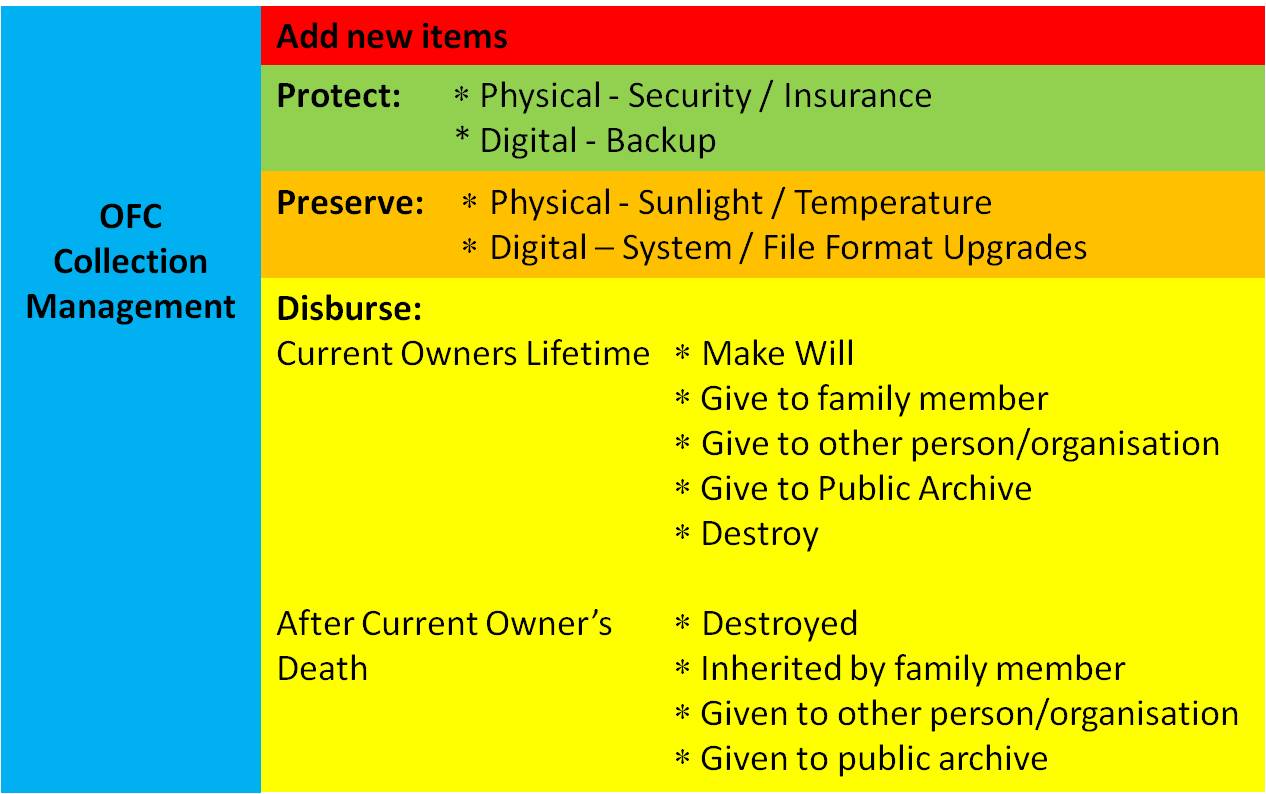
If a slightly broader perspective is taken, the overall maintenance – or management – of a collection will not only include all of the above, but also the activities of adding new material (as discussed in U5.6) and its eventual disbursement. Regarding the latter, owners have the option of either writing down what they wish to occur in a will, or of actually carrying out the disbursement themselves during their lifetime. All these activities are summarised in the diagram below.