Sounds for Alexa

Having decided to create a book listing all our albums, I soon realised that there were a couple of other things that could be included. First, there are several albums that I no longer have but which I have fond memories of. Second, for the last 4 or 5 years I’ve been reading The Guardian reviews of new albums and listening to samples of their tracks in the Amazon site and including those I particularly like in my Amazon Wish List. By subscribing to Amazon Music Unlimited, all these albums should be available to listen to through Alexa, so I’m going to include these in the book as well.

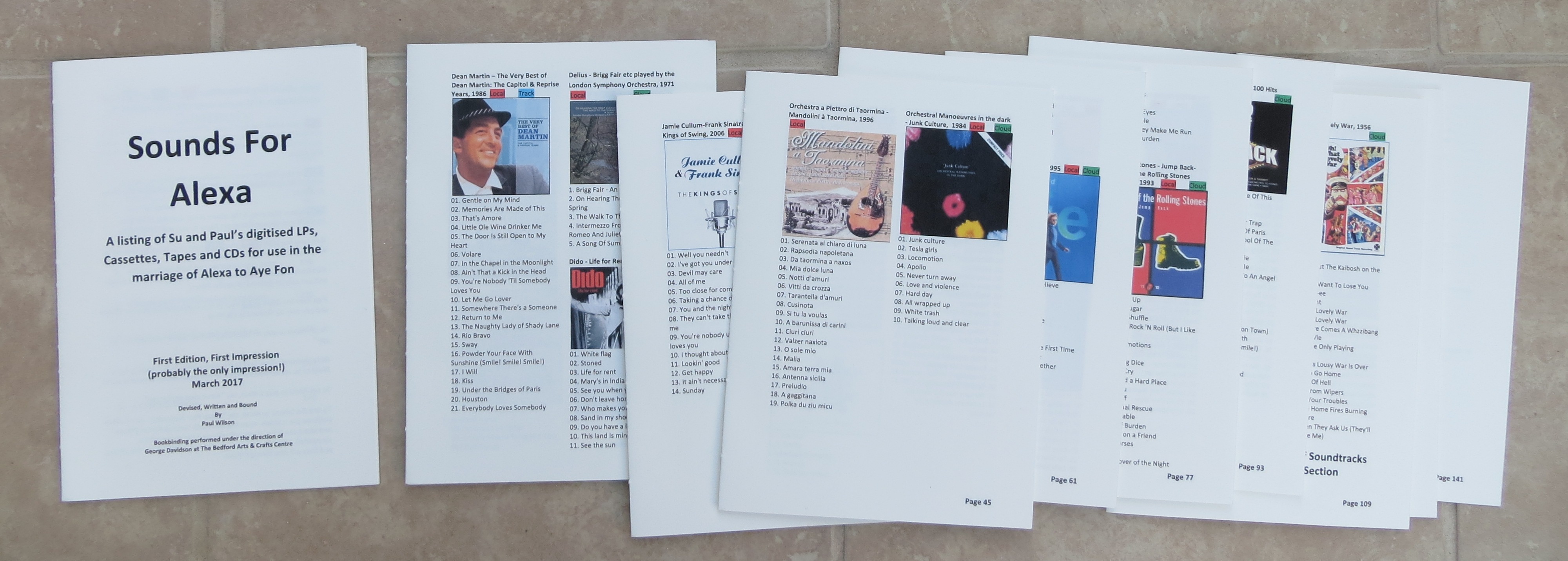
Since every album in the book would be playable either directly by Alexa or on the iPhone through Alexa, I decided to create simple colour coded icons for each of those mechanisms and to allocate one or both to every entry. To make it a bit easier to use the book in conjunction with Alexa, I’ll top and tail the book with some guidance about using Alexa, and with an index to the artists listed in the book. I also decided to leave some blank pages at the very end of the book so that there will be space to handwrite new entries as we discover new music that we like. All these elements combine together into the following Contents list:

  1. Su & Paul’s Digital Sounds Collection (Individual Artists, Various Artists, Singles, Soundtracks, Spoken Word)
  2. Albums that Paul has sampled and likes
  3. Albums that Paul likes but hasn’t got
  4. Albums that Su likes but hasn’t got
  5. Index
  6. Additional Entries

The title of the book has to reflect the fact that it contains more than just music, so in the end I decided to go with ‘Sounds for Alexa’ with a sub-title ‘A listing of Su and Paul’s digitised LPs, Cassettes, Tapes and CDs for use in the marriage of Alexa to Aye Fon’

With this structure in place I set about populating the sections. For our digitised collection I was able to draw on the digital folders and files for the titles and album art. I also included the track list underneath each album picture, by using Microsoft’s ‘Copy as Path’ function (select all the sound files in an album, hold down the shift key and right click the mouse). If the result is pasted into excel, it’s a simple matter to copy the whole of the standard path in front of the actual track names, put it into the Find and Replace tool, open up the replace section with zero contents and do ‘Replace All’. This deletes all the path information. The ‘.mp3’ extension at the end of the file names can be removed in a similar way. This leaves just the track numbers and titles which I then copied into the Word document.

The Amazon Wish List material was simple enough to copy and paste into the book – though I didn’t attempt to try and find track titles for each album – that would have been a step too far! The final section – albums I would like but haven’t got – was again populated by finding the album concerned within Amazon and copying and pasting the relevant information.

Although this initial population of the book was very time-consuming, it was at least relatively straight forward. The next phase – finding out what Alexa could and couldn’t play – was considerably more demanding.

Alexa’s Arrival (and I Start Bookbinding)

Alexa arrived at our house last December accompanied by glowing references regarding her musical abilities and her speaking skills. Within an hour or so she had found a spot in our kitchen-diner and had settled in.

Alexa is, of course, Amazon’s Echo product whose main feature is that you use it by talking to it – no screens, no keyboards, just the word ‘Alexa’ and then whatever you want to request. For example, ‘Alexa, play BBC Radio 2’, or ‘Alexa, play the album 25 by Adele’.

Su had seen an advert and I had looked up some reviews on the net which were pretty complimentary. We realised that, as well as enabling us to play our digitised music, Alexa would give us access to radio stations. The sound quality was reported to be very good, and the device itself was a relatively small cylinder which would take up very little space. We found a good deal from John Lewis (reduced from 149.99 to £119.99) and duly placed our order.

At first, we just relished the ability to call up UK radio stations (and I even managed a station from as far afield as Singapore); and then I figured out how to get Alexa to play the music on my iPhone using a Bluetooth connection. Following some suggestions in the weekly ‘What’s new with Alexa’ email, I tried Alexa’s multiple choice adventure game, asked her to tell me a joke, and set up the Jamie Oliver add-on (or ‘skill’ as add-ons are known in this Amazon world) to get some advice on recipes. Finally, when we realised that Alexa could play just about any song or album, we took advantage of Amazon’s offer of a free month using Amazon Music – and then just rolled over and took out the £3.99 a month subscription.

It was a significant moment. In the space of about 6 weeks we had overcome two of our longstanding problems – a) not having a decent sound system with our record collection sitting next to it, and b) not being able to get good quality radio reception. However, there was still one facet of this arrangement which falls short – it’s not possible to glance across a shelf of CDs to look for inspiration about what to play.

It was a completely fortuitous coincidence that around this time I had enrolled on one of the very few Bookbinding courses in the UK at the Bedford Arts and Craft Centre some 20 minutes away from where I live. As I started creating my first book – a 160 page A5 notebook with blank pages – I started to realise how that final shortcoming of our Alexa setup could be resolved: I could create the ‘bookshelf’ of all our LPs, tapes and CDs in a book which we could keep next to Alexa. The book would include the album covers so you could flick through and let your eyes be caught by familiar images; and it would specify whether each album could be played by Alexa or would have to be played on the iPhone through Alexa. Having recently completed the digitisation of all of our albums, I knew that I had all the information and album art in my laptop; and with my rudimentary knowledge of book binding, I was pretty sure I could assemble the material in a Word document that could be printed out in the form required to create a book. With a growing sense of doing something rather interesting, I embarked on structuring the book and setting it up in Word.

Ripping Yarns

I completed ripping (copying) the second batch of our CDs (about 80 of them) a couple of days ago, and am now working on the order of service for Alexa’s wedding. But before we go into that, I’ll recount some of my experiences of digitising CDs.

The ripping software I’ve been using is Windows Media Player (WMP) – an easy choice since it comes bundled and free with the Windows operating system. WMP provides an option to require it to automatically rip any CD that’s inserted into the computer’s CD player. So, ripping 80 or so CDs is not such a difficult job. You just push the CD into the slot, let the software get on with it, and do nothing else until the tray is ejected and you can replace the CD with another one.

WMP places the contents of a rip into a folder that you pre-specify as another option (I’ve specified the ‘My MUSIC’ folder). It creates a main folder for the artist, and then a sub-folder for the album into which the actual track files are placed. There are some exceptions to this structure: compilation CDs are placed into a main folder labelled ‘Various Artists’ and film or stage music is placed into a ‘Soundtrack’ main folder. WMP is able to pick this information up from the ‘Properties’ of the track files (more of this later). I have added a few other main folders to accommodate some of the material that I have digitised from tapes and LPs – a ‘Spoken Word’ main folder for tapes of friends and family talking, and for audio books; and a ‘Singles’ main folder for our old 45 singles record collection and other singles compilations. To give you an idea of volumes, I now have 283 ‘album’ folders within 135 main ‘artist’ folders, and this whole set of material takes up about 22Gb.

The quality of the information that WMP puts into these folder names and into track file names when it rips a CD, is entirely dependent on the quality of the information on the CD. For CDs issued by large commercial record companies, the information is usually complete and correct. However, I have come across CDs with a variety of problems such as incorrect album date, information for a completely different album, and no information whatsoever. When WMP encounters missing information, including missing album art, it will automatically try and find it on the net (provided you have accepted this default WMP option). Should it be unsuccessful the only thing you can do then is to manually input the missing information into the Properties of each track file.

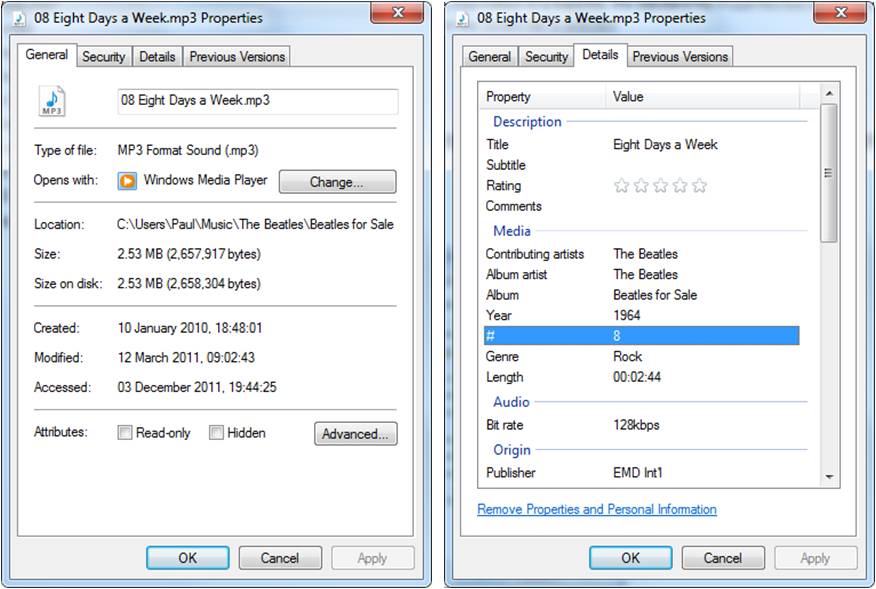
To adjust the information in a track file, the standard file Properties box is opened in the normal way, and then the Details tab is selected (see examples below).

The Details tab contains a large number of information fields, however the ones I’ve found to be worth getting right are:

  • Title (it is this Title and not the file name that appears in WMP)
  • Album Artist
  • Album
  • Year
  • Genre (I think you can specify anything in here)

In cases where there is no information on the CD and WMP hasn’t been able to find it on the net, I’ve just had to take the information from the CD cover and manually type it in. Of course, for tapes created at home of people talking etc. all of this material has to be created from scratch – including the Album Art jpg file which WMP uses to display the album in its library. However, once the relevant files have been populated, the album and its individual tracks will appear in the WMP library. If WMP can’t find an Album Art jpg file it will display a blank icon with a musical note in it. I find this unsatisfactory and go out of my way to provide a  picture of some sort or another. In my experience, much album art is available somewhere on the net, however, if I can’t find any, for music CDs I scan the covers that come with the physical CD; and for LPs (which are too big for my scanner), I take photos of the sleeve and then crop it to the exact size. For tapes that I have created myself of people talking etc. I have tended to either use a relevant photo or to construct an appropriate picture in PowerPoint.

Having completed all this work, I can now see all my album covers in the WMP library; can search on album titles, artists, track names and genre; can play all this material on my laptop; and have downloaded it onto my iphone for listening to when away from the laptop. However, it still hasn’t really solved the problem of not having all the physical CDs next to a CD player in a room where you can look through the collection, choose something to listen to and slot it into the CD player. However, it was the arrival of Alexa that spurred this final batch of ripping, and it is the marriage of Alexa to my iPhone (using some surprisingly old technology) that I’m hoping might go some way towards addressing this shortcoming. I’ll describe how in my next entry.

How the technology escaped us

It was back in 2008 that I started to digitise our tapes and remaining LPs. Now we’re on the final leg of this digitising journey and soon will be up to date with the technology after we’ve finished arranging Alexa’s marriage. But I’m getting ahead of myself. First let me describe how we got started.

Like everybody else, we were left with large collections of LPs and cassette tapes when CDs started to make their mark. We replaced those which had Compact Disc versions and which we liked best, with their CD counterparts. However, by 2008 we still had some left, as well as a reel-to-reel tape and a number of cassettes with recordings of events, family and friends. It was clear that unless they were digitised we would eventually have no equipment to play them on. So, I acquired a Numark TTUSB turntable with a USB audio interface, downloaded the free open-source Audacity recording and editing software, plugged in an old ghetto blaster cassette deck, and set about digitising the remaining LPs and cassettes. It wasn’t particularly difficult – though it did take a while to establish how to set the most appropriate recording levels, and to become familiar with Audacity’s editing functionality.

The 9 inch reel-to-reel tape was a different kettle of fish. I had no such equipment of my own and didn’t know anyone who had one. However, I did have a friend who used to work in BBC radio and she put me on to an ex-BBC sound engineer who retrieved the contents and put them onto a CD for me for a small fee (which my friend very kindly paid – thank you, Vanessa!).

It was about a year after this that my daughter gave me an iPod Nano for Christmas and that was the spur for me to rip all the CDs in my study (as opposed to the household’s collection of CDs downstairs) and to download them, as well as all the other music and spoken word material I had previously dealt with, onto the tiny device. I took great pleasure in being able to bring all this material to life by having the ipod play random selections using its ‘shuffle’ feature whenever I turned my laptop on in my study.

In the meantime, our main household music collection was now held entirely on CDs and was played on either the TV’s DVD box in the lounge or on a wall mounted CD player in the conservatory.  The main CD collection was held in a separate downstairs room, and a small subset of CDs was kept on the conservatory window ledge. This wasn’t really a satisfactory arrangement since a) we didn’t use the TV’s CD player capability very much at all; and the main CD collection was stored well away from our only CD player; but it worked for when we needed to play some music.

Meanwhile, the world was storming away with new hand-held devices designed to, among other things, play music; with new music services like the Apple Store; and with new (quite expensive) digital music systems, such as Sonos, designed to store digital music and play it on dedicated speakers throughout the house. In 2012, I acquired an iPhone and put some music onto it – though I can’t say I listened to it a great deal. I also set my laptop up to act as media server and acquired a dongle for our lounge TV so that we could select music residing on my laptop and play it through the TV. Again, we only used that capability infrequently for parties and the like because, apart from having to ensure the laptop was switched on and not in sleep mode, the search and retrieval facilities through our TV are very cumbersome).  There was no further change in our household music situation until we moved house in 2015 and moved the CD player into our kitchen-diner room – though the CD collection was still held separately.

For the last couple of years I’ve been hearing more and more about Spotify – mainly from my son-in-law and daughter who use it as their main music source. They seem to have done away with the notion of a music collection and just call up whatever they want to listen to. I’ve been impressed by what you can call up, but not enough to actually decide to sign up for such a service and to install the necessary speaker systems in the house.

In actual fact, we’ve just been left behind by a series of technology changes that we don’t fully appreciate or understand. We started out in our youth by listening to our favourite LPs over and over again on music centres which also played cassettes and the radio; and, despite all the technology advances, we now listen to music much less often – and probably watch more TV than we used to. I suspect it’s not an uncommon story. If we’d had lots of spare money, I would have been inclined to just install a Sonos-type system throughout the house; but we haven’t got unlimited funds and somehow music has never been at the top of the priority list while we’ve been able to play what we want to listen to in some way or other.

However, everything changed for us towards the end of last year when Alexa arrived….. to be continued….

Collaborators sought – and found!

I started digital preservation work on my pawdoc document collection by first recruiting my son, Matt Fox-Wilson, to help with the project. Matt is the co-owner/developer of the ArtRage natural painting software package, and his experience as a software engineer is likely to be of use in the work. I then sent out the following request to other potential collaborators via the JISC Digital Preservation email list:

————————————————————————————————————

From: Digital-Preservation Announcement and Information List [mailto:DIGITAL-PRESERVATION@JISCMAIL.AC.UK] On Behalf Of Paul Wilson
Sent: Wednesday, 7 December 2016 5:53 a.m.
To: DIGITAL-PRESERVATION@JISCMAIL.AC.UK
Subject: Learning opportunity for digital preservation in document management systems

Collaborators are sought for a digital preservation project on a collection of some 40,000 documents stored in a document management system. This will be an ideal opportunity to gain practical experience of a variety of digital preservation challenges in an informal, small scale environment, unfettered by organisational constraints.

The project will apply the preservation planning methodology developed by Paul Wilson and published by the Digital Preservation Coalition in May 2016 – see http://dpconline.org/component/docman/doc_download/1509-casenotepwilsonpreservationplanningver2

The project will start early in 2017 and is likely to last for between one and two years. Collaborators will be expected, as a minimum, to familiarise themselves with the background and high level contents of the collection in question, to comment on the preservation planning documents that are produced, and to participate in the project meetings at which decisions are taken. Such participation need only be remote and will probably take up about one day a month excluding the time spent on familiarisation. However, it is hoped that participants will wish to benefit from the project in more substantive ways; they will be encouraged to play a full part in the decision making that will be required and in the detailed preservation work itself. Such involvement will be determined in the course of the project. It is anticipated that the learnings from the project will be written up and submitted for publication.

The project is likely to be of particular interest to collaborators who have experience of managing collections of Personal Archives, or who work in organisations that own such collections. Location is not a constraint for participation, however people and organisations from the UK and New Zealand are particularly encouraged to get in touch. Interested parties should contact Paul Wilson at pwilsonofc@btinternet.com

————————————————————————————————–

I had two responses and am currently confirming the involvement of the people concerned. Things are looking good for commencement of the project in January 2017.

Survey Findings

I’m glad to be able to write my final entry on this subject as I’ve found it a rather tortuous and boring exercise. In fact, to keep pushing me along, I’ve had to keep reminding myself that I embarked on this survey because Household files are such an integral part of the domestic information landscape. The results do, indeed, reflect that. I discovered over 9,800 documents residing in 113 files placed in 15 separate locations – and bear in mind that these were purely household related files and did not include personal correspondence or specialist professional-type material. True, 71% of these were in email folders – but that simply reflects the importance of email in today’s information landscape. Even when emails were excluded, 31% of the remainder were still in electronic format.

The 15 locations were many and varied – a wooden chest, 3 study drawers, a study bookcase, a study window ledge, 2 email accounts, 2 laptop computers, 1 iPhone, a kitchen drawer, a utility room cupboard, a garage drawer and a shed drawer. There was also a great deal of variety in the type of containers that the files were held in: cardboard folders, poly folders, plastic folders, plastic pockets, plastic button wallets, a plastic zip-up wallet, 10-pocket plastic pages, presentation folders, email folders, electronic folders, an iPhone app, ring binders, a plastic bag, a manila envelope and a box.

Four fifths of the documents addressed nine main topics – Local Community activities (17%); Sport-Related Clubs, Associations & Activities (16%); Orders & Receipts (11%); Non-Sport-Related Clubs, Associations & Activities (10%); House Sale and Purchase and Renovation Work (7%); Banks & Credit Cards & Money Saving Advice (6%); Loyalty Accounts (Shops) (6%); Loyalty Accounts (Airlines & Hotels) (5%); Service contracts & Bills (Gas, Electricity, TV, Phone, Broadband, TV, etc) (3%). The remaining fifth deal with Holidays, Year Files (mementos and sundry docs for possible future ref), Pensions, Tax & Benefits, Healthcare, Legal Documents, Recipes, Instructions/Guides/Guarantees, Cars, Insurances, Budgeting, Local Community Information, Garden, Investments, Mortgage, Service Leaflets/Business Cards/Vouchers, Retirement, Key info about relatives,  Death related documents, and Inventory of items in the loft.

In the course of the exercise, I threw out about 1,980 documents and this just confirms what is common knowledge – people don’t prune their files very often. In the case of hardcopy files, it is often only the shortage of available space that prompts the pruning activity. However, for email files there may be no such prompt – in this survey large amounts of free storage were available in the email system. Two other reasons were also identified for not pruning the email files – first, the fact that the large amounts of material arriving via the email system are too great to be able to easily undertake additional filing work on them; and, second, the email archive can be searched at will to find email addresses or specific content.

Overall, the survey clearly shows that digitisation has had an impact in four distinct ways on these particular household files:

  • much information is coming in by email and the email system itself is being used as a primary storage repository for household files;
  • some household files are being generated on the home computer;
  • some household information which arrives in hardcopy format is being immediately scanned and stored only in digital form;
  • some old hardcopy household files are being scanned and archived in digital form.

However, the survey also highlighted the fact that hardcopy may be a more appropriate format for material which needs to be used by both partners when a shared electronic filing system is not available.

Of course, because this survey has looked at only one household, it cannot be used to reach general conclusions. As with most of the other investigations recorded in these OFC pages, it shows only what can be done, NOT what everybody is doing. As such its findings and conclusions must only be used only as a starting point for further thinking and investigation.

Sorting Electronic Files is tedious….

This week we’ve been travelling away from home so I havn’t been able to complete work on the physical household files. Instead, I’ve been using my periods of free time to go through the household files on my laptop. And what a tedious business it is. At least with paper files you can use your hands and arms to pick up papers and move them around; you can turn your neck to look at papers here and over there; and you can completely change your position to get comfy. But with a screen you’re locked-in with eyes fixed, head in one place, and body stationary staring at an unending stream of similar looking files. Anyway, I‘ve nearly finished now, and it’s clear that, just as with paper files, it’s easy for electronic files to just pile up over the years. The difference being that with paper files you can see individual folders expanding and no longer fitting into the physical space they are in; whereas with electronic files, its only when you start to run out of space on the entire hard disk that you realise you have too much material to cope with.

First observations

After getting through the first 11 folders, I’ve eventually settled on collecting the following information for this exercise: Ref #, Location, Container Type, Container Name, Document Descriptions, # of Docs, # of Docs scanned, # of Hardcopy kept, # of hardcopy thrown away (calculation = #Docs – #HardcopyKept), New Electronic Folder created for Scan Y or N, Location of Scan in Laptop, Rationale for Action and Notes.

I’ve also noticed a couple of characteristics that have already emerged from this small subset of material. First, for several of the files, only a proportion of the documents originally filed were deemed to be worthwhile keeping for the long term. For example, car insurance policy documents usually include the full small print pages and handbook; however only the pages showing the details of the policy and its cost were considered worth scanning and retaining (in electronic form only).

The second characteristic concerns the naming of the files of scanned  documents. I’ve taken to including key information in the file names such that a list of the files in a folder in Windows Explorer becomes a very visible database. For example, in the case of scans of the documents related to cars I have owned, I’ve recorded the period of years I owned the car, its registration number, and the make and model, in the file name, so, when looking at the list of file names, one can see a full record of car ownership over the years.

Of course, both these points have emerged from observing an environment in which hard copy files built up over the years are being digitised; they may no longer apply when documents originate in electronic form (such as those arriving by email) or are digitised immediately they arrive. I will reflect on all this as I work through this exercise.

What and Where?

I have one final set of files that I haven’t looked into yet and that comprise an important part of an individual’s ability to maintain Order in the face of Chaos.That is all the documents associated with the ongoing management of one’s house and activities.

By their very nature, the types of household files and the way they are dealt with and stored will vary from household to household. However, it is probably true to say that the emergence of office technology, the internet and email have had a significant impact on what documents come into every household and on everybody’s perception of what it is necessary to keep. In this respect our own household files have undoubtedly changed and slimmed down over the last 20 years or so – though in a somewhat piecemeal manner. This exercise will take a more focused approach to trying to identify ways in which digitisation can help to keep our household files in order.

The files currently reside in either a big old chest, in my or my wife’s desk drawers, in a kitchen cupboard (that’s the recipes), in email folders, or in file folders on my laptop; and I believe that the material falls broadly into the  following categories: finance; legal; products and services; organisations; and practical information. I shall tackle the chest first.

A Simplified Spec

The lack of entries here for three years tells the story that my 2013 Roundsheet specification did not inspire anyone to start building a prototype. In fact, I only showed it to a couple of people, but neither were particularly complimentary. Re-reading the 2013 spec now, I can understand why. In trying to extend the concept to a three dimensional ball, it had all got too complicated. So, I’ve gone back to the basic idea of being able to break circles (Rounds) down into segments (Slices), and being able to collect the Rounds together into a cylinder (Roll). I’ll see what my colleagues think of the revised, simplified spec.