Yesterday I completed the process of ensuring that I have electronic copies of all the papers for which I have made an entry in my index, and set about trying to find a home for my hardcopy collection. I first emailed a colleague to give him first refusal, but he already has access to a set. So I sent in a small advert for The Ergonomist – the monthly magazine issued by the Institute of Ergonomics and Human Factors. I’ll have to wait and see if anyone still wants hardcopy now that electronic documents and communication are firmly established in the world at large.
Category Archives: JOURNEYS KCOMPLETED
Reading papers – single or several?
I’ve just been catching up on three weeks of BIT Alert emails (3 new volumes and four new paper online alerts) which I haven’t been able to deal with due to other priorities. I’ve found it hard work to deal with the whole volumes – particularly those which include several papers I’m interested in and need to read and digest; and which had been received prior to me getting Alerts. My rather obvious conclusion is that I would far rather receive the Alerts prior to publication so that dealing with a whole volume is essentially just a checking affair to match up the papers with what I had already dealt with via the Alerts. Having said that if there are several papers that I’m interested in in a single Alert the effect is just the same – its hard work going through several papers in a single session. As with most things, its easier to do things as they occur rather than dealing with a backlog. So I would prefer an Alert to be about a single paper and for it to be sent out immediately it is available for issue, rather than accumulating a number of papers for inclusion in a single Alert message. Having said that there are probably some people who would prefer to work the other way. Perhaps users should be given the option to choose their preferred way of working.
Updated Wish Table Template
Further experience of using the Wish Table has identified a need for another category for ‘Unusual item’ (U) to indicate that those inheriting a memento might find it interesting to look at. The Wish Table has been updated to include the new category. Another version of the Wish Table has also been constructed to facilitate more granular analysis of the categories that have been selected.
- Wish Table Template v2.1 – 13Apr2013 – Excel version
- Wish Table Template for Category Analysis v2.1 – 13Apr2013 – Excel version
- Wish Table Template v2.1 – 13Apr2013 – Word version
Wish List Template
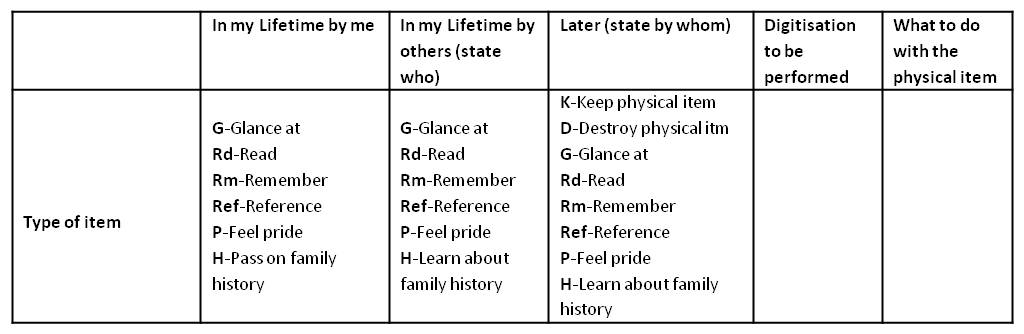
As a precursor to starting on the Year Files, I used the analysis of what I want to achieve (described in an earlier entry), as the basis of a Wish List pick list to aid in deciding what to do with each item – the headings of that version of the Wish List are below.
After having used the Wish List for the several hundred items contained in year files for 1958 – 1969 I have observed the following.
- New category required: Even if none of the categories apply, there are still some items which I’m reluctant to throw away. These tend to be rare or unique items which have an attractive appearance or contents of an immediate interest. An example is the first issue of the Loughborough University arts magazine Masque in 1968. I have no particular connection to the production or contents of it – but nevertheless am reluctant to just throw it away. I propose to introduce a new category for such items called ‘Too Special to throw away’.
- Named individuals: People other than oneself referred to in the Wish List must be specified. However, in practice, most of the time the individuals concerned are one’s family descendants. Therefore, the Wish List will be changed to require only those people other than family descendants to be specified.
- Glance, Read and Remember categories: When selecting the Remember category I seemed to be always also selecting either a Glance or Read category as well. The Glance and Read categories are in effect the mechanism for remembering rather than a desire in their own right. To sort this out, I went back to the desires that I originally teased out for my Retirement cards (described in earlier entries), and I concluded that I was trying to distinguish between wanting to be reminded about some people/place/experience/feelings, and wanting to not forget some people/place/experience/feelings. The latter is the ‘Remember’ category and the former is the ‘Glance’ or ‘Read’ category. Therefore the three items ‘Glance’, ‘Read’, ‘Remember’ categories in the Wish List will be changed to ‘Not forget’ and ‘Be Reminded of’. These two new categories should have an impact on the storage and display options that are chosen.
- Digitisation and Physical item options: The digitisation options specified in the ‘Digitisation to be performed’ column seemed to be always either ‘Scanned to PDF’ or ‘Photographed’; while the physical item options in the ‘What to do with the physical item’ column seemed always to be ‘Put in Presentation folder’ or ‘Destroy’. In practice these two categories seem to be mixing up a) whether a digital or physical version will be retained, b) how the digital or physical item is to be retained, and c) how the item is to be presented in order to achieve the Wish List desires. Therefore, to make these columns more useful, they will be replaced with the following:
– a column headed ‘Include in Digital collection Yes / No’
– a column headed ‘Include in Physical collection Yes / No’
– Text above the table stating “All items to be included in the digital collection will be either Scanned to a PDF file or photographed to a JPG file, given a file name which includes the Reference Number allocated in the index, and stored in the ‘PAW-PERS Files’ folder on my laptop.
– a column headed ‘How the digital item will be displayed’
– a column headed ‘How the physical item will be displayed/stored’ - Word or Excel format: The Wish List form is currently a Word file which works fine for recording the information, but makes it difficult to analyse the full set of choices that have been made. Therefore an Excel version of the form is also provided.
The Wish List Table now looks like this:
A revised Roundsheet specification
Around 1994, I specified in a document that the term “Roundsheet” was my own property. It designated ideas I had been developing about an alternative to the two-dimensional spreadsheet. Subsequently, in 2010, I came up with some more thoughts on the concept. Now, some 19 years after I had the idea, I’m going to try and nail down a specification and maybe try and get a prototype built.
After reviewing my previous writings on the subject, I concluded that the obvious next step was to tighten up the 2010 document particularly with respect to the top level components, and to define explicitly what types of data the Roundsheet could handle. The result is a revised, very high-level, specification (4. Roundsheet Spec v0.4 – 24Mar2013) which provides a reasonably complete and internally consistent description of the Roundsheet functions. Three short illustrations of its use have also been included.
In considering what to do next, two aspects seem to be key – protecting the intellectual property, and getting the tool built. From what I have heard about applying for Patents, it sounds very time consuming and expensive and only worthwhile if you genuinely expect to be able to capitalise on the ideas. I don’t have such confidence, therefore I am reconciled to just including a statement asserting my ownership and rights to a royalty percentage, on my writings on the subject.
Regarding getting the tool built, I am not going to attempt it myseIf as I don’t have the necessary current knowledge of platforms and programming languages – and am not prepared to spend huge chunks of my time acquiring the expertise. So, if it is to be built at all, I will need to find someone else to do it. First, however, it seems sensible to get some other opinions as to its viability and usefulness to assess if it’s worth trying to persuade someone to invest their time on it. With this in mind I’m going to send this latest spec to a few people and ask their views.
Plans for Year Files
We have Year Files into which Su and I put material which we want to keep but for which there is no other obvious place for it to go. It’s a handy system which serves two purposes: it’s a short term store for things you might want to refer to in the next few years such as receipts, and it’s a long term store for mementos. However, as the years go by the storage space required increases relentlessly. We are now on our seventh box in the loft – below is an example of one of them.
As well as requiring storage space, there are several other disadvantages of keeping the material in this way:
- it’s relatively difficult to access,
- a lot of the material is generally invisible and often gets forgotten about,
- if we move house it will add to the removal effort and cost,
- if we move house there may not be sufficient storage space available to take it,
- such a great pile of material may be more of a problem than a joy for those who inherit it.
To try and address these issues, we’re going to go through it, throw away unwanted material, digitise where appropriate and make visible the things we want to enjoy. The lessons learned when assembling the photobook of work experiences can be applied – particularly the approach to uncovering what we really want to achieve with each set of material and how to turn those desires into reality. As we work through it, I’ll be reporting on what we experience with each different set of material.
Sadly, the one unique feature of the Year Files will be lost – the ability to traverse a year chronologically through all its activities, family mementos, major events, and trivia. However, that’s a pleasure that, in practice, is not in great demand. In any case, once the material has been transformed, perhaps a future piece of work could explore how to re-create that experience on demand.
A problem with Alerts
In the last 5 days I’ve received five messages from BIT:
- three alert messages giving advance notice of various papers accepted for BIT;
- a message announcing the 2nd issue of BIT for 2013;
- and another message announcing the 3rd issue of BIT for 2013.
Since I didn’t deal with them all immediately, I now find myself having to do a relatively substantial amount of work all at once. It would have been much better if these emails had been spaced out a little more. It certainly seems undesirable and unplanned to notify users of two whole issues of BIT within 4 days of each other. I presume that it was caused by problems in the production process. However, my view is that, as a matter of policy, notification of new issues should be spaced as far apart as possible.
Neither of the two issues contained papers I had already previously seen through the alerting process, so I reviewed their contents on screen – first checking the abstracts and then the full text if they looked interesting. As noted before, this experience was fine.
However, checking the alert messages was a little less satisfactory. Because several alert messages are sent out for the same paper as it goes through its reviewing and acceptance cycle, I wanted to establish if I had already checked a paper before spending time on reading it again. I’ve worked out that you can identify papers new to the alerting cycle by looking at the publishing history at the beginning of the paper. Basically, if it has more than one Posting/Publishing entry then one can assume an alert has previously been sent out. If this was the case, I double checked all the previous alert messages (stored in my mail system) that I had received. Once reassured that I had already seen the paper I was able to discount the alert and store the email. For the papers I had not already seen, I reviewed them in the same way as described above i.e. read the Abstract and then, if interested, downloaded and scanned/read the full text.
My current feeling is that the alerting process doesn’t quite meet my needs. I haven’t properly thought it through yet, but I suspect I would prefer to be able to specify my alerting requirements at a much finer level of detail i.e. for each of the standard stages in the reviewing and publishing cycle. I know that my choice would be to only get alerted the very first time a paper is made available online. I don’t believe such granular selection options are currently available.
One other thing has happened in the last week: as a result of a conversation between Dave O’Neil (the Chief Exec of the Institute of Ergonomics and Human Factors) and Taylor & Francis (the publisher of BIT), I now have online access to all back issues of BIT. So I am proceeding to download those issues referenced in my filing system, prior to then trying to find a home for all my hardcopy issues of BIT.
Reflecting on the poster management exercise
Digitising all the posters, pictures, paintings and artworks has certainly been a useful exercise. It has:
- enabled unwanted physical items to be thrown away;
- prompted the permanent display of some paintings that had hitherto been stored away;
- given visibility to items normally stored away from view, using free standard issue Windows 7 software;
- prompted the purchase of a frame to rotate pictures through;
- prompted the flat storage of some items that had hitherto been rolled up in cardboard tubes;
- provided a digital record of our paintings of value for insurance purposes should that ever be required.
Since the numbers of items involved (in this case around 80) is relatively low, the whole exercise didn’t take long to do. However, as with all other digitising activities, dealing with a large backlog of material is always much more daunting and time consuming than simply doing it bit by bit as you go along. Now that the initial job has been done, the challenge will be to maintain the digital collection as new physical items are added and other items removed.
Displaying and rotating the physical posters
For displaying the physical posters, I decided to rotate them in a single frame and to store the bigger ones at the rear of the frame. I never got to see a Snap frame (which allows the front to be opened) and instead purchased a large 36 x 24 inch beech frame from the Frame Company for about £34 and £7 next day postage. The backboard is secured to the edge of the frame by folding down 4 or 5 metal strips along each side, and I figured these would be flexible enough to accommodate the thickness of the 6 or 7 posters I wanted to store in the frame. This turned out to be the case – with enough room for a few more if necessary.
I duly constructed the montage I had been planning out of the colourful 10-20 year old covers of “Interactions” – the ACM magazine for the discipline of Human Computer Interaction (having scanned their contents it seemed a waste to just throw the covers away). The resulting 30 x 18 inch collage is quite informative and interesting but not particularly pleasing to the eye. Ah well, you can’t win them all. Anyway, at least it did provide a focal point and incentive for obtaining the frame – and it will only be on display some of the time as it takes its turn in the rotation of the posters and pictures through the frame – provided I do actually perform the rotation – only time will tell.
I didn’t really explore the use of Snap front loading frames for the reasons of cost, looks, the lack of any product to look at, and not being able to understand how multiple posters could be held securely (ie. without slipping down) while being stored behind the picture being displayed. Having said that, and despite my desire to try out storing posters/pictures at the back of a frame for rotation, I do believe that probably the best way to store most posters and pictures is in a large art case – provided you can get one big enough to take the largest size poster that you have.
To emphasise the point that the purpose of the frame I have purchased is to rotate posters and pictures through it, thumbnails of all the posters and picture not on permanent display in the house, have been printed out and glued around the edge of the mount in the frame. In principle, one could select from the thumbnails, which poster or picture to display next in the frame. Although the net result is quite busy as you can see below, it does do the job. Perhaps it would look better with something other than the collage on display in the middle of the frame.
Digitising the Posters and Pictures
The digitising exercise has been very rewarding. All the posters, paintings and drawings in the house – some 80 or so items – have been reviewed and photographed. Some of the ones that had been in storage in the loft or elsewhere have been framed and put up on the walls. Items of more sentimental interest than physical value (such as graffiti on large wall sheets from parties held long ago) were photographed and thrown away.
Photographing the items proved relatively easy and quick to do using a modern digital camera and a white background, though two pitfalls were encountered. First, you have to be careful not to tilt the camera when above the picture otherwise the picture does not appear rectangular in the photo. Second, reflections are difficult to exclude when photographing framed pictures under glass. Despite these problems, however, the digital images are pretty good, so I turned my attention to using them to make the posters and pictures more visible in three different ways:
First, I put all 80 odd images into a single folder and specified that they be displayed in slideshow mode as the desktop background of my Windows 7 laptop.
Second, I specified that they be displayed as a slideshow as a screensaver in my Windows 7 laptop. I[ could also have specified that they be displayed as within the Windows 7 Slideshow Desktop Gadget which appears as a small window on the desktop – but I considered that to be overkill. Instead I use the Slideshow Desktop Gadget to display all the images in the My Pictures folder – very effective].
Third, I printed out thumbnails of each of the images not currently on permanent display in the house, to go around the edge of the physical frame that I’ve bought – more of this in a subsequent entry on displaying the hardcopy posters.
The net result is that the posters and pictures are all now highly visible – I see them everyday as I use my laptop. They are almost too visible, so at some point I may just display them in either the desktop background or the screensaver. However, the objective of making them more visible has certainly been achieved. Its to be noted that all three functions I’m using – Desktop Background, Screensaver and Slideshow Desktop Gadget – are all free pieces of software that come bundled with Windows 7.