Clear Blue Calm Water

Unfortunately, the paper summarising the PAWDOC digital preservation work has not progressed in the last few months because the DPC has too much work on at the moment to deal with it. I’m hoping this might change in the early part of 2019.

In the meantime, I have just completed another important aspect of digital preservation work on the PAWDOC collection. I have long been concerned that the collection resides on a laptop running Windows 7 – an operating system for which Microsoft have said they will withdraw support in 2020.  At the same time, the battery in my existing laptop no longer functions so requiring that it be mains-connected at all times. So, about a week ago I acquired a Chillblast Leggera i7 Ultrabook with 8Mb of RAM and a 1Tb Samsung Solid State Drive (SSD). I listed a set of conversion activities and started working my way through attaching peripherals (keyboard, mouse, scanner) and loading software (Anti-virus, Scanning, Filemaker, MS Office, Cloud backup). All went well until nearly at the end when I hit the wall of connecting the external Dell 2405FP monitor which I bought in 2006, and which has worked fine ever since with at least three different laptops.

I had planned to use the laptop’s HDMI port and had acquired an HDMI to DVI adapter to enable an HDMI cable to be plugged into the Dell monitor’s DVI port. Unfortunately, the connection only worked for a few minutes. After that the monitor’s DVI interface went into Power Save Mode and, no matter what I tried, I couldn’t get it out of that mode. I then tried searching the net for a fix and discovered a huge number of entries about this problem for several different models of Dell monitors stretching back to 2005 – with no definitive fix emerging. I decided to try using the VGA port on the Dell monitor and duly purchased an Amazon next day delivery of an HDMI to VGA converter. Unfortunately, this simply had the similar effect of putting the monitor’s VGA interface into Power Save Mode.

However, a ray of hope did appear when I plugged the VGA lead back into my old laptop, and the Dell monitor immediately came out of Power Save Mode and the screen image was displayed. I was able to obtain the monitor menu while it was attached to the old laptop and returned the monitor back to factory settings – but this didn’t make any difference – every time I attached the laptop’s HDMI port to either the monitor’s DVI or VGA interfaces they returned to Power Save Mode.

My last-ditch effort to resolve the problem was to try using the laptop’s Mini Displayport (MD) port, and, in a state of some depression and resignation, yesterday I duly purchased an Amazon same day delivery of an MD to VGA adapter plug.  It cost £5.99, was ordered around 9am and was delivered around 8pm (really…). With the laptop switched off, I put the adapter into the laptop’s MD port and plugged in the monitor’s VGA cable. The buttons on the monitor went orange (signifying Power Save Mode) and I thought, ‘here we go again’ and switched on the laptop; and suddenly after a few seconds I saw a bright light out of the corner of my eye and, blow me down, there was the laptop screen on the monitor! I used it for a while and then, trepidatiously, tried closing the laptop lid and it kept on displaying on the monitor. Later, I shut the laptop down and subsequently fired it up again – but still no problem – up it came on the monitor. So it looks like this is now working OK. Phew.

This morning I reorganised my physical desktop and placed the new smaller laptop in a new position immediately next to my scanner so that the problem of making the scanner cable reach the laptop port was eliminated. With the conversion process complete and my desk back in some sort of order, I began to feel more in control of things and much more relaxed. I had sailed into clear blue calm water in the sheltered bay of an up to date operating system and a modern laptop.

The power of the shower

This morning I finished digitising the CSCW conference proceedings, including the creation of a bookmarked contents list for each one (rather a tedious process), and downloaded the PDFs to the Sidebooks app on my iPad. Although this was a largely mundane exercise, I was stimulated from time to time when I came across author and project names that I had become familiar with while I was working in the CSCW field in the early 1990s. Reflecting on this in the shower this morning, I remembered my conclusion a week or so ago that, for memorabilia, the journey was often better than the destination. Suddenly, in a deluge of shower illumination, I realised that it was the remembering that had been fulfilling; and that the act of remembering is an act of doing; and that ­any thoughts about memorabilia – even just pondering the fact that they are where you put them and can be accessed when you wish – are ‘doing’ acts. It is when items cease to stimulate any thought or interest that they become worthless. Conversely, while items of memorabilia still inspire some physical or thinking action, they still have some value for the individual.

I continued to think through the meaning of this insight and concluded that it has significant implications for why we keep things; and that it will necessitate the adjustment of parts of the OFC tutorial text (though I must add that I’m sure these ideas are not new – but I have the luxury of not having to trawl the huge literature to see what has been documented before: that is the job of academics who should be appropriately paid to do a very difficult, laborious and hugely important job). This experience has cemented my belief in the innovative power of the shower, and makes me wonder just how important ablutions have been to the development of modern civilisation over the centuries.

Proceeding with proceedings

The final stage in this sort out of work books/documents concerns the seven volumes of proceedings of conferences on Computer Supported Cooperative Work that appear in the picture below.

The first of these events was held in Austin, Texas, in 1986 and I was there to experience the excitement of a new field being born. It was a field which embraced the Cosmos project that I was participating in at the time, and a field in which I actively worked for the following five years. In 1989 I was to organise the first European CSCW conference, EC-CSCW89. Hence, I am particularly attached to the proceedings of both the 1986 and 1989 events, though the 1986 volume is in poor condition with the cover having come away, and the 1989 volume is spiral bound. So, I’ve decided to turn both volumes into hardback books and to incorporate some additional pages of related material in the process.

As for the remaining 5 volumes, although I attended all but one of the events they document, I am unlikely to want to look at them in the future so have decided to digitise them and include them in my electronic bookshelf collection so that at least the covers and spines will be visible for decor and I’ll have the comfort of knowing that the text is immediately accessible should I want to take a look at it.

Careering through time

A trawl through my CV to identify major pieces of work I’d produced prompted the discovery of some memorable material – and some I’d forgotten about.  The end result was 98 documents all neatly packaged as numbered PDFs and recorded in an index. However, while I expected them to be mostly reports I’d written, the documents turned out to be much more diverse than that. This was because some of my work assignments had been rather open-ended in subject matter and long term in timescale, so there was not necessarily one or more reports that could represent my efforts. Instead, I started looking for documents that would tell a story about my involvement and what had happened. Hence, of the 98 documents, only about half were substantive reports written entirely by myself or in conjunction with others. A further 20 were shorter documents written by myself. The remainder were short documents written with others (16); documents providing context for work I was involved in (17); summaries of what was going on or handover reports when I left an assignment (6); newsletters produced by myself (3); and, finally, two documents were hardcopies of special editions of HCI-related magazines which were on my bookshelf and which I was loath to part with.

It was hardly surprising that such a range of documents emerged since the memorable aspects of work involve more than just one’s own efforts, and usually includes what we do with others and what is going on about us. In fact, I had to be pretty selective in my choices since my work document collection includes most of the items that I received and produced; and the index to the collection makes it very easy and quick to list all the documents related to a particular topic or, in this case, assignment.

The process I went through for each element of my CV was to first search for any specific document I remembered and wanted to take a copy of. Then, to produce a list of all the index entries related to that assignment and to go through the list (sometimes including a hundred or more line items) and to note the reference number of any that I wanted to look at further. This was a very good test of my newly revamped filing system in which documents are no longer stored in a document management system but simply reside in Windows folders named with the appropriate reference number (see entry in Personal Document Management Journey).  It proved very easy and quick to find documents and to open them up  – which was a good job because, inevitably, I was having to look at several different documents before making a decision about which one to go for.

I had decided before the start of this process that I only wanted to keep electronic copies and that the only hardcopies I might keep would be the fourteen that were already on my book case. That is how it turned out, though I did throw out one of the fourteen – a rather thick spiral bound item which consisted largely of a user manual. None of these items are sturdy enough to stand up on their own – they are either folded papers, stapled papers, spiral bound documents, or magazines. So I acquired a large portfolio box from TK Max inscribed with ‘Around the World’ on the spine – a highly visible distinguishing feature. Four of the hardcopies were in a ring binder, and these too were placed in the portfolio box, together with a printout of the index,  so that all this material is now in one place and not flopping around on the shelves.

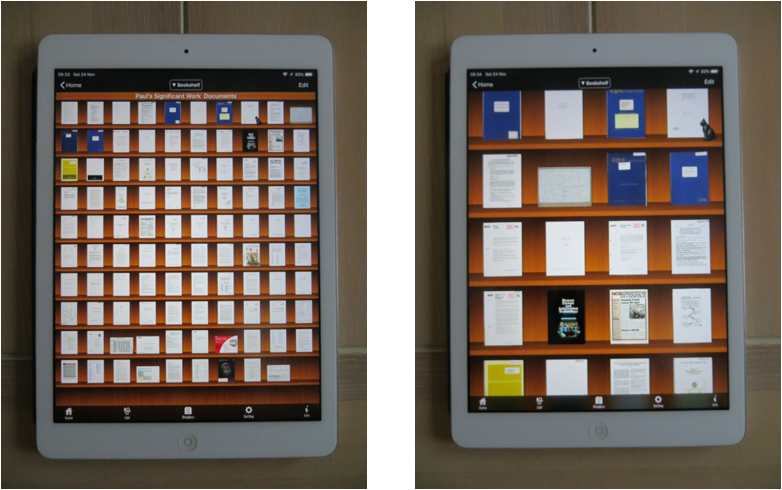
Regarding the electronic versions, in some cases they were stored in my files as PDFs, so little further work was required. However, many were stored as either multi-page TIF files or as MS Office Word or Powerpoint files. These were converted to PDFs using the eCopy PDF PRO application. For the larger documents I created linked content lists in the form of sets of bookmarks, numbered each file, and moved a copy of each file into a special folder setup to be the master of this set of material. However, my preferred way of viewing such material is within the Sidebooks application on the iPad. Files can be transferred to Sidebooks using Dropbox and this example of system integration works brilliantly. It only took a few seconds to copy all the files (362 Mb in total) and to place them into the Dropbox folder on my laptop. They showed up in the Sidebooks Dropbox area within a minute or two; and then each one was selected in turn and took just a few seconds – none more than 10 seconds – to download into Sidebooks where they can be displayed as either a text list of file names or as variously sized thumbnails as shown below.

The exercise is now complete. I don’t know how often I’ll be looking at the documents – probably not very much – maybe never; but, just knowing they are there is a reassuring feeling – not having them there might generate a little nagging wish. Furthermore, going through all this material and being reminded of what I have done has been a very fulfilling experience. As I keep being reminded, in the matter of memorabilia the journey is often better than the destination.

Reports and the satisfaction of achievement

Part of a shelf in my bookcase is taken up with hardcopies of a few reports and documents that I wrote or had a hand in writing. I’ve kept these because the hardcopies were available and I feel they are substantial pieces of work (they fall into the category of ‘Items that the owner has written, produced, assembled or made a significant contribution to’ as documented in the paper produced in the Digital Age Artefacts journey). However, these are just items that I came across in the course of doing digital preservation work on my work file collection; I have produced many other reports and documents over my working career, some of which I feel are just as substantial.

In thinking through what I want to do with this material, I’ve concluded that I don’t really want the hardcopy except in particularly special cases. However, I would like to have electronic versions of all the major reports I’ve produced in order to be able to look through them from time to time, to see how my ideas developed, and to enjoy the satisfaction of achievement. So, my plan is to use my CV to guide me through the various companies I’ve worked for and assignments I’ve undertaken, and to search my work files for reports I may have produced in each one. I’ll take an electronic copy of some of those that I find and give each one a serial number in the file title. The files will be recorded in an index in chronological order, and stored on my iPad. At the end of the process, any hardcopies that I’ve decided to keep will be placed into a box file on the bookshelf.

Organising Publications

Since retiring in 2012, I’ve been gradually sorting out my work documents and books (see the Personal Document Management, Electronic Bookshelf and Electronic Story Board journeys), and in the process have been finding things I’ve had published and putting them in a holding location on a shelf. I’m not an academic, so I have never had a career incentive to publish papers; I just got into the way of doing it when I had a job at the National Computing Centre in the early 80s which entailed seeking out best practice in Office Automation and feeding it back into UK industry via books, articles and talks. So, now, with at least 30 or 40 papers and books to my name, I’d decided to try to make sure I had a copy of each one.

My plan was to keep all the originals for my own sense of satisfaction (as already documented in the paper produced in the Digital Age Artefacts journey – they fall into the category of ‘Items that the owner has written, produced, assembled or made a significant contribution to’). This physical set of material would have an equivalent electronic version which would reside on my iPad for easy access and to enable me to possess copies if, at some time in the future, a lack of space or changed circumstances prevents me from having the physical versions on hand. The collection would be controlled by adding serial numbers (1, 2, 3 etc) to the publication list that I’d been maintaining since the 1990s, and using that as an index. This would enable each physical item to be labelled, and each electronic file to have the serial number included in its file title thereby ensuring that the iPad items would be displayed in chronological order.

Over the days that I was developing this approach, I also spent some time thinking about whether this material would be of any interest to my family after my decease. I concluded that probably only the books I had published would stand a chance of being retained. Large published tomes of conference proceedings which include 9 or 10 pages of a paper I had presented would almost certainly end up in a charity shop or auction lot. As to whether the family would want to retain the electronic collection downstream, it’s difficult to say. They would certainly find the electronic version easier to curate; but whether there would be the interest to do so is an unknown.

With my plans in place, I set about a process of taking each item on the index, finding the physical publication, obtaining an electronic version from my files or by scanning the original, and storing it as a PDF with its number, name and date in the file title. It turned out not to be so straightforward. For a kick off, several of the physical items that had been assembled on the bookshelf weren’t on the index and this wasn’t discovered until part way through the job. Consequently a certain amount of renumbering had to be done midstream. In retrospect, it would have been more sensible to start off by reconciling what was on the shelf against what was on the index. Other complications included:

  • for some of the entries in the index, there wasn’t an equivalent hardcopy on the shelf and I had to search out a version from my work files.
  • for some items, the original publication wasn’t immediately to hand so a search had to be conducted through the work files and, If it wasn’t found, a decision had to be made as to which version of the piece was to be used.
  • for several items the original was in a book, requiring a scan to be made of those pages by placing the open book on the scanner platter and pressing down to obtain a usable scan of each page. These scans had to be refined within a PDF editor to crop out black areas round the edges and to assemble the pages in the correct order within the final PDF. For two of the books I’d written, a spare copy was not available to cut up and put through the sheet feeder; so I had to deal with the whole of the two books in this way.

For a number of the papers, it was not clear whether or not they should be classified as publications and included in this set of material. For example, I excluded some reports I had produced for the UK Alvey Programme Cosmos project on the basis that they were very project specific and had to be requested from a published list. Other types that did make it through my somewhat arbitrary criteria were:

  1. conference papers for which I wasn’t able to determine if any proceedings had actually been published or if my paper had actually been included
  2. workshop papers presented at conferences but not included in any proceedings
  3. a paper and a book review published in the British Library’s experimental electronic Journal Blend system in the 1980s
  4. a spiral bound state of the art report for NCC’s Office Technology Circle
  5. papers rejected by journals
  6. papers completed but not submitted for publication
  7. an article which I wrote but which was presented in a promotional booklet not as an article by myself but as a case study about me
  8. a fully integrated online tutorial on HCI in 27 parts presented over the internal network of the company I worked for and accessible to its 90,000 employees worldwide
  9. a so-called White Paper describing what I meant by ‘Order From Chaos’ and published in an early version of this OFC website.

I suppose the overriding criteria was that the piece should contain novel material with general applicability, was produced as a complete and coherent whole, and was made openly available – whatever all those words mean! In fact, I guess I just included the pieces I wanted to….

One other point is worth noting: wherever possible I included a scan of the cover and contents of the publication that the paper appeared in, or of the event that the paper was produced for, at the end of the PDF. This was done because the book covers on the bookshelf, or the event details, provide some kind of identity for the papers. The contents were included to provide a clear indication of the context within which the papers were presented and their exact positions amidst all the others

Having been through all the material, I ended up with some 61 items in the index, 61 separate PDF files, 19 physical books, and a box file containing the other 42 papers in journals, spiral bound publications, and print outs – as shown in the photos below. The box file was essential to store those items which would otherwise just flop about on the bookshelf.

Work is different

Work in this context refers to one’s employment – the activities that people do to earn a living and sustain themselves. It seems to me that, for many people, work is fundamentally an individual activity; they have their own capabilities and skills, and they are employed as individuals – even though they may well perform their work as part of a group. Hence, when it comes to valuing and keeping work-related materials, attitudes and approaches may well be slightly different to mementos and other things which are acquired in life outside work and which are more likely to be known about, understood and valued by an individual’s family and close friends.  These are just broad assumptions and generalisations, however they are based on my observations in some of the journeys recorded in this blog – for example, memento management, organising family photos, electronic bookshelf and electronic story board.

These musings were prompted when I started to deal with my last remaining unsorted bookshelf containing:

  • Publications: books I have written, and books and journals which contain papers I have written
  • Reports: work documents I wrote or to which I contributed
  • Proceedings: seven sets of conference proceedings on a subject I was particularly involved in
  • Specials: books or journals of particular significance to me and/or which are first editions or first volumes.

I hesitated to create a new OFC topic to discuss how such items can be dealt with because I thought the material was too specific and that any conclusions would not have wide applicability. However, when I got stuck into the Publications, and remembered that I’d already been dealing with work-related items in other journeys, I thought that perhaps some more generally applicable conclusions might emerge. We’ll see.

DPC Publication Plans

A few days ago I agreed a way forward with the Digital Preservation Coalition (DPC) regarding the publication of the paper describing the PAWDOC digital preservation work: I will create a post summarising the learnings from the work, and the DPC will attach an edited PDF version of the whole paper, as well as the updated templates, to the original Case Note describing how I derived the preservation process that I applied to the PAWDOC collection. I’m hoping this will all be achieved by the end of October.

Story Board Switch-On

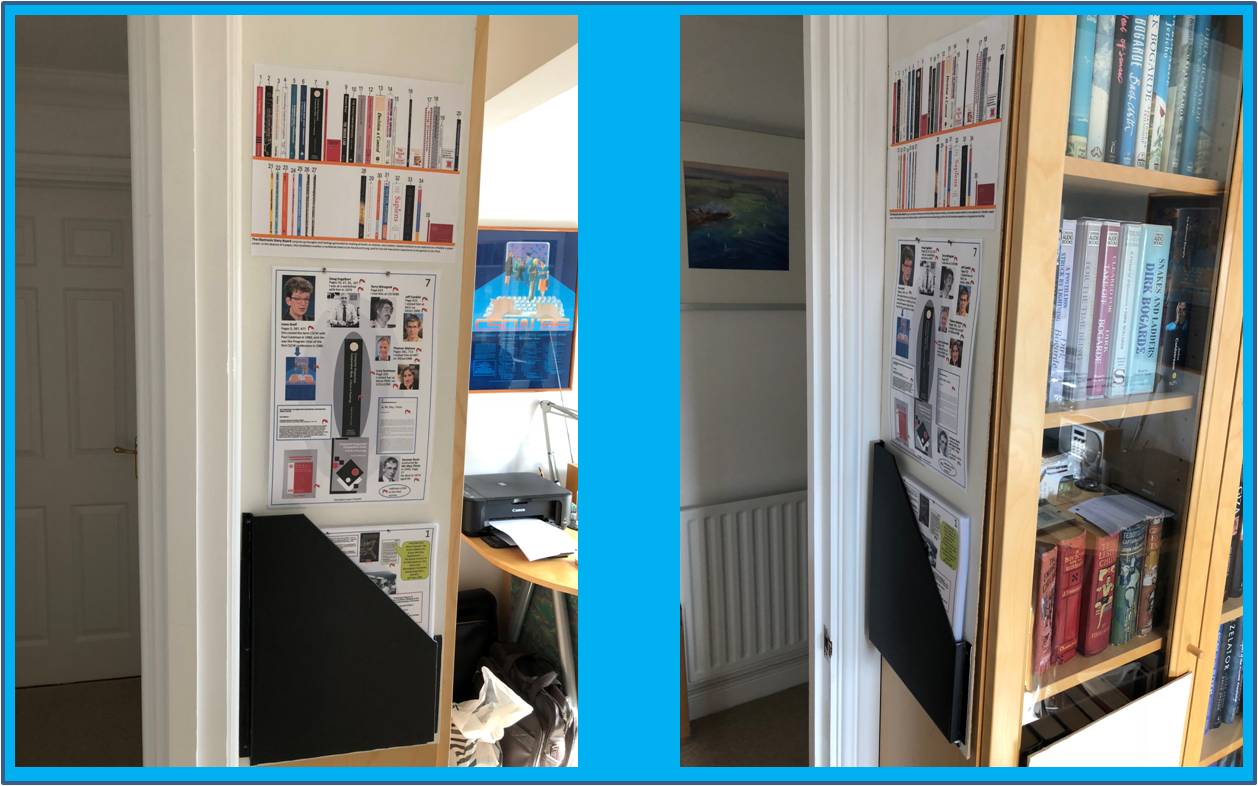
This afternoon my Electronic Story Board went live on the side of the bookcase.

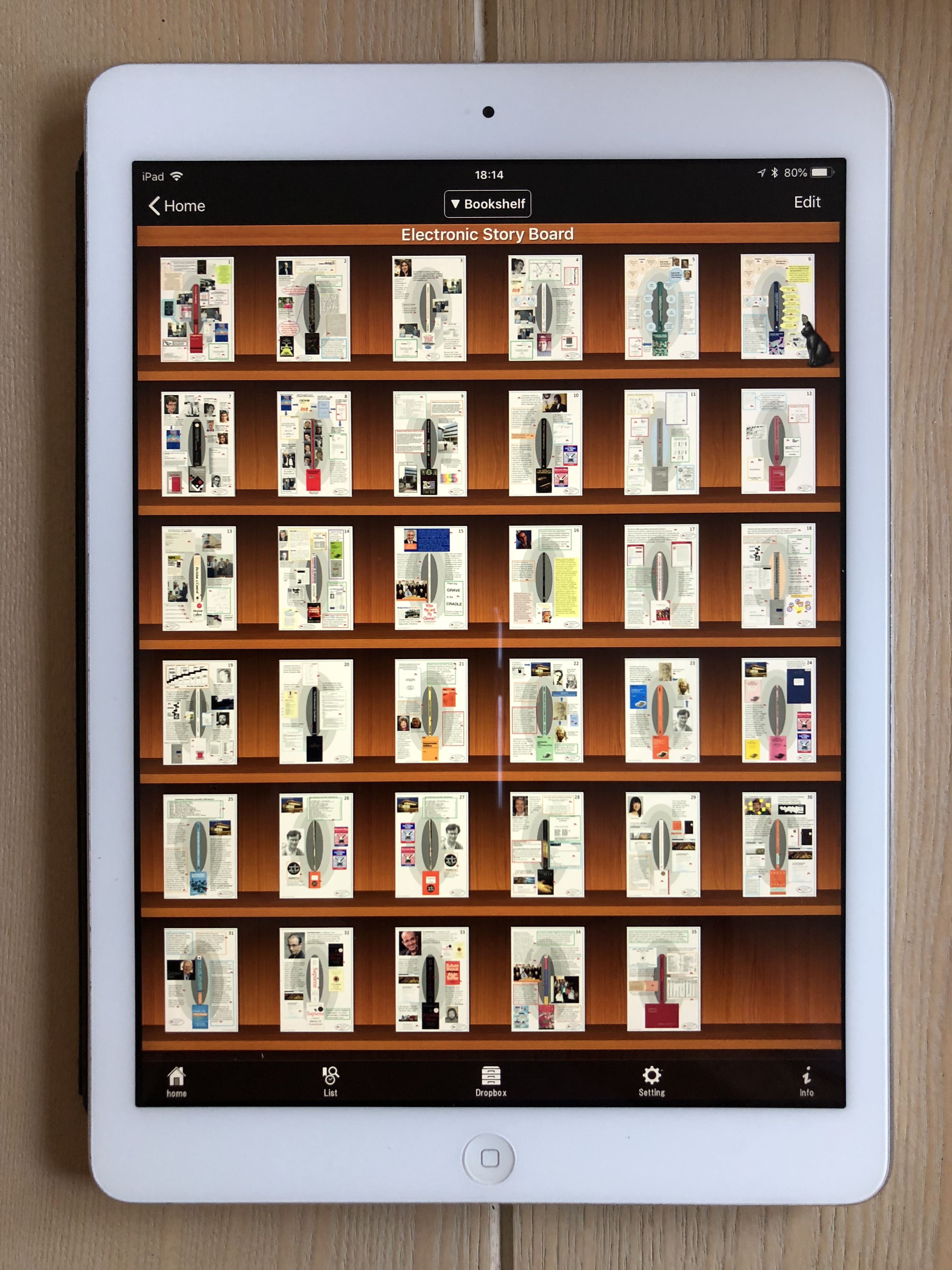
Well, perhaps not so much ‘live’ since this is a simulation in the absence of electronic paper; though the electronic interaction part of the installation does exist – it’s just that its on my iPad in a very useful app called Sidebooks.

For the last week I’ve been slogging through each of the 35 Story Boards, getting the numbers of each one in line with the number of the spines on the virtual bookshelf and making minor adjustments and corrections. This has been a laborious process because the front page Story Boards have been created in PowerPoint, exported as JPGs, and imported into the PDFs. Unfortunately, its the front page Story Boards that have the links to all the accompanying pages in the PDFs, so importing a new version of the Story Board requires all the links to be reset in the new Story Board page. Anyway that all got finished yesterday, after which I was able to finish laminating the front page Story Board pages.

Today, I spent the morning creating the physical Story Board with its holder for the laminated pages, Its sticking-out very small screws on which the hole-punched laminated pages are to be suspended, and its holes and cord to suspend it down the side of the bookcase. The result looks reasonable and seems to work: I’ve just been up to it and changed the existing Story Board on display (7. Grief – CSCW A Book of Readings to 16. Pawson – Expressive Systems) and it was quite quick and easy. However, I think its going to be a while before I know how I  feel about this PHYSICAL Story Board, because its significantly different from the ELECTRONIC PDF versions that I’ve spent a lot of time creating over the last month. Watch this space.

Trekking through Story Board construction

I finished creating the 35 story boards and associated PDFs with linked material, a few days ago and it was quite a trek – despite having previously recorded what events, people and artefacts each book reminded me of. This was because I have a complete collection of indexed work documents and an extensive collection of indexed memorabilia, and each search of these archives brought to light additional material. For example, in searching for details of my visits to the Media Lab, I discovered not only a review of the Media Lab book which I had written for the Hicom Human Computer Interaction forum, but also my Hicom write up of the talk that Nicholas Negroponte, the head of the Media Lab, gave at Imperial College in 1989. Most people don’t have such extensive archives but, even so, I think they would probably still uncover additional forgotten material, if only in their minds, as they focused on the topic in hand.

For many of the books, I tried to find photos of the authors and of other people mentioned in the Story Boards, and, for the most part, this seemed fairly easy to do, though finding versions from the times they wrote their books, or from when I knew them, was a little more difficult; I didn’t really want to include photos of unrecognisable people who were 35 years older than I remembered them. In contrast, there was just no trace of some people, let alone a photo of them.

The other thing that was particularly striking as I waded through the books was the amount of information I came across that was new to me. Several of the authors had died – some at surprisingly young ages (for example, Michael Hammer, the co-author of Re-engineering the Corporation, had died in 2008 aged 60; and Susan Leigh Star, part of the Editorial Collective of the CSCW journal, died in 2010 aged 56); and others had made major job changes (for example, Lucy Suchman, author of Plans and Situated Actions, had moved from Xerox PARC in California to the UK’s Lancaster University). It was also a bit of a revelation to find out that my employer in the early 80s (the National Computing Centre in Manchester) had got into severe financial difficulties in 1996 and, after failing to take advantage of a number of rejuvenation and rescue attempts, was finally totally extinguished in 2017. Much of this additional information came from Wikipedia which often seemed to be the most immediately accessible and complete source of information.

The story boards I was creating are only single numbered pages which will be laminated and placed in a box on the physical Board. However, the PDF versions afford the ability to link an almost unlimited number of pages of additional information from the main Story Board page at the front of the file. I took full advantage of this facility and ended up with between 50 and 150 additional pages for each book. These will be fully accessible when I place the PDFs in the SideBooks app in my iPad. As I put these PDFs together, it wasn’t difficult to imagine all the documents in the collection being interlinked in a giant hypertext framework as envisaged by Jeff Conklin in the early 1980s, such that any of the material in the collection would be accessible via a number of jumps from any Story Board.

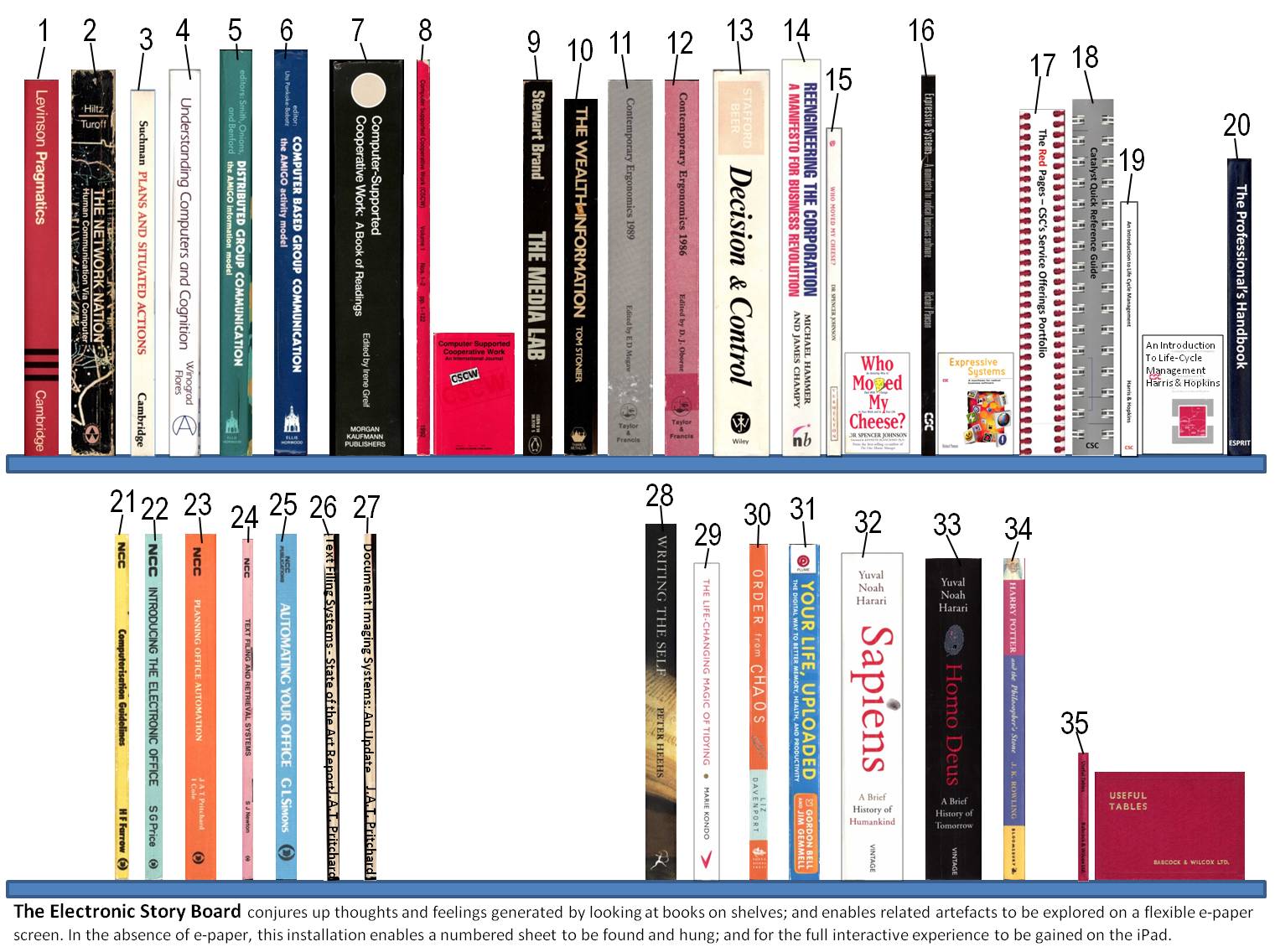
Having produced the 0.9 versions of the Story Boards, I turned my attention to creating the page of numbered spines which will act as the index for the physical story board. There wasn’t enough space to put full size spines on a single page, so I elected to have them one third of actual size. Achieving this reduction proved relatively easy by using the PowerPoint proportional formatting function whereby the arrow controlling vertical size is held down until its value is one third of its original value. The current version of this page is below. It’s interesting to note that there’s space for additional items should the need arise.

 I’m now in the process of including the appropriate number on each Story Board and making final adjustments and corrections to each one; it won’t be long before the printed sheets can be laminated and the physical Story Board constructed.