Started and Exported

A week ago the Pawdoc DP project started in earnest after 14 months of Scoping work. The Project Plan DESCRIPTION document and associated Project Plan CHART define a 5 month period of work in 10 separate sections. The Scoping work proved to be extremely valuable in ensuring as far as possible that the tasks in the plan are doable and of a fixed size. No doubt there will be hiccups but they should be self contained within a specific area and not affect the viability of the whole project.

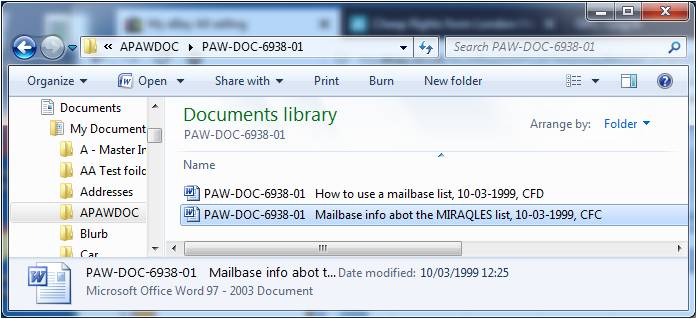
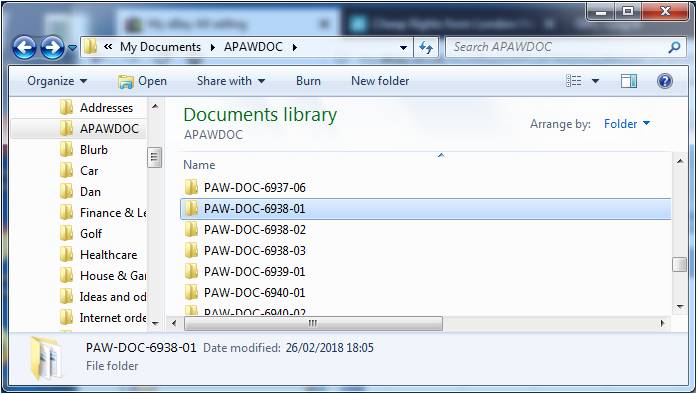
It took rather longer than anticipated to get the m-Hance utility to a position where it can be used to export the PAWDOC files – though I guess such delays are typical in these kinds of transactions. First there was an issue around payment caused by the m-Hance accounting system not being able to cope with a non-company which could not be credit checked. I paid up front and the utility was released to me once the payment had gone through the bank transfer system. After that there followed a period of testing and some adjustment using the export facility WITHOUT deletion in Fish. At that point I finalised the Plan and the Schedule and started work. However, although it was believed that the utility was working as it should, there followed a frustrating week during which its operation to export WITH delete (needed so that I could check any remaining files) kept producing exception reports and the m-Hance support staff produced modified versions of the utility. There’s an obvious reminder here that nothing can be assumed until you try it out and verify it. Anyway, all is well now and the export WITH delete completed successfully late last night. I decided against re-planning to accommodate the delays in running it in the belief that I can make up the time in the course of the three weeks planned to check the output from the export.

Taking Stock

I took stock of our Amazon Music services today. We have two Echo devices – one in our kitchen-diner and the other in our conservatory – which both have access to the full Amazon Music Unlimited library (apparently containing 40 million songs). For this we’re paying £9.99 a month. If we took out an Amazon Prime subscription at £79 a year, this fee would be reduced to £7.99 a month.

I had originally planned to subscribe to the Amazon Music Storage service so that we could download those albums that are not in Music Unlimited and listen to them directly through the Echos; but this service was discontinued last month. So, to listen to those albums through the Echos, we need to play them on our iPhones and connect the iPhones to the Echos using Bluetooth – quite easy to do but a little less convenient.

Given all this, I think we have reached an end point for the time being with the development of our music playing capabilities. We have access to all our music – but still don’t seem to listen to it that much. I make occasional use of the ‘Sounds for Alexa’ book – and, indeed, have enjoyed listening to some of the new albums I picked out when I was reading the Guardian music reviews and which were included in the book. I have the Music Unlimited app on my laptop which provides lots of info about the latest music, but I haven’t really made any use of that yet; and I only occasionally hear some music on the radio in the car and then ask Alexa to play it on the Echo.

Perhaps the greatest use we’ve made of the Echo is when we had family round over the Christmas period, and people enjoyed the novelty of asking it to play their favourite songs. Apparently this is a fairly typical scenario, though it is not everybody’s cup of tea; at least one of our family positively dislikes Alexa because it just takes over the proceedings with an Alexa-fest of constant calling out, song playing, crazy question asking, and the placement of risque items on our Alexa shopping list.

Apart from music, the ability to play radio stations is definitely useful. However we have had less success with asking Alexa general questions such as sports scores: quite often Alexa doesn’t understand what we’re saying, or we fail to phrase the question in a way that Alexa can home in on the answer.  Another interesting phenomenon is that occasionally Alexa thinks we have mentioned her name when actually we’ve been saying something completely different; she suddenly pipes up out of the blue, and we have to issue a curt ‘Alexa Stop!’ to quiet her down.

No doubt Alexa’s voice recognition will improve over time; and maybe we’ll start to use the additional services that Alexa is providing now (such as links to the phone) and that she will, no doubt, be providing in the future. But, as far as our music playing capabilities go, we feel we’ve  done as much as we need to for the time being, so this journey is at an end.

Book vs Blog

Now that the content of the book has been put to bed and the focus has turned to bookbinding activities, it seems a good moment to reflect on whether this attempt to replicate a web site in book form has worked or not. First, though, it’s important to be clear about the following differences between the pwofc.com site and most other web sites:

  • there are no adverts
  • all the material is static – the content doesn’t change or move while being viewed.

Having said that, there are several standard web site/blog features in pwofc.com which the physical book may, or may not, have been able to replicate. They include:

  1. Selectable Sections
  2. Links between sections
  3. Links to background in-site material
  4. Links to external web sites
  5. Enlargement of text and images
  6. Categorisation changes
  7. Addition at will
  8. Updating at will
  9. Correction at will
  10. Device display variability
  11. Copying capability
  12. Visibility
  13. Accessibility
  14. Storage capability

Here’s how each of these features were dealt with in the physical book:

1. Selectable Sections

Blog feature: The Blog content was divided into 22 separate topics which appeared permanently as a list down the right hand side of the screen. Whatever content was displayed in the main part of the screen, any topic could be selected and traversed to from the list on the right.

Book capability: The Book has no equivalent functionality with such a combination of immediacy and accuracy; however, it does enable the pages to be flicked through at will; and the contents list at the front allows the page number of a specific topic to be identified and turned to.

2. Links between sections

Blog feature: At any point in the Blog content a link could be inserted to any other Blog Post (though not to specific text within that Post). The links were indicated by specific text being coloured blue.

Book capability: The same text is coloured blue in the Book. In order to provide an equivalent linking capability, the date of the Post being linked to and the page number it is on are included in brackets immediately after the blue text.

3. Links to background in-site material

Blog feature: At any point in the Blog content a link could be inserted to additional material held as a background file in the web site. The file could be of any type that could be displayed – an image, a Word document, a spreadsheet, a PowerPoint presentation etc.. The links were indicated by specific text being coloured blue.

Book capability: The same text is coloured blue in the Book; and the content concerned is included as an Appendix at the back of the book. To provide an equivalent linking capability, the number of the Appendix, its name, and its page number  are included in brackets immediately after the blue text.

4. Links to external web sites

Blog feature: At any point in the Blog content a link could be inserted to a page in another web site. Sometimes the full web address was included in the Post, and at other times some descriptive text was provided. In both cases, however, the text was coloured blue and the relevant HTTP link was associated with it allowing the relevant web page to be immediately visited provided it still existed on the relevant web server.

Book capability: The same text is coloured blue in the Book. Where the HTTP link is provided in the Post then no further text is included in the book. However, where descriptive text is provided in the Post, then the full HTTP link is spelled out in brackets in the form, ‘see http.xxxxx’. To visit the page concerned a reader would have to type the HTTP address into a browser.

5. Enlargement of text and images

Blog feature: Browsers provide functionality to enlarge both text and images. This is of particular use to people who have poor eyesight; and to those wishing to see greater detail in some of the images included with the text.

Book capability: Books have no such integral functionality. Readers have to employ glasses or magnifying glasses to see enlarged text or images. I don’t know for sure whether greater detail and clarity can be achieved with browser magnification or with magnifying glasses on print, however, a comparison of the screen and the printed page version of one of the images (on page 713 of the Book) indicates that much definition is lost in the printing process.

6. Categorisation changes

Blog feature: Current topics in the Blog are listed under the heading ‘Journeys in progress’; whilst completed topics are moved under the heading ‘Journeys KCompleted’ (the inclusion of a K at the beginning of ‘Completed’ is simply to ensure that Completed Journeys  was lower down the alphabet than Journeys in Progress and therefore would appear underneath the list of Journeys in Progress  – I wasn’t prepared to waste further time figuring out how to achieve this in WordPress/html).

Book capability: The Book reflects the status of the web site at a particular point in time and therefore doesn’t need to have this capability. However, this really glosses over a key, fundamental, difference between a Blog and a Book. The blog is a dynamic entity – it can keep changing; whereas a Book has fixed contents. Of course, a Book’s contents can be added to by handwriting in additional material; and the contents of a Book can be read in different orders if appropriate signposting is provided. For example, this particular book could be read in the order that the Contents are listed, or in the order of the entries shown in the Timeline section – though this latter approach would be rather laborious since it would involve a lot of leafing through the Book. Overall, however, a Book simply does not have the Blog’s ability to be changed.

7. Addition at will

Blog feature: New Topics, new Posts within a Topic, and new material within a Post can be added to a Blog at will. In some circumstances this may be considered advantageous. However, it also means that readers cannot be sure that what they have already read is the latest material. There is no feature to highlight what is new.

Book capability: As described in item 6 above, a Book simply does not possess the Blog’s ability to be changed. However, readers can be secure in the knowledge that once they have read the Book they know what it contains and have finished what they set out to do.

8. Updating at will

Blog feature: The contents of a Post can be updated at will, though, as described in 7 above, this may leave readers feeling uncertain about the contents. There is no feature to highlight what has changed.

Book capability: As described in item 7 above, a Book simply does not possess the Blog’s ability to be changed; however, at least readers know that once they have read the Book they know what it contains and have finished what they set out to do.

9. Correction at will

Blog feature: Corrections of typos, poor grammar, and factual errors, can be made to the contents of a Post at will. There is no feature to highlight what has changed, though this perhaps is only of concern for the correction of factual errors – readers will not be interested in corrections to typos or poor grammar.

Book capability: Although corrections can be made by hand on the Book’s pages, the handwriting is likely to detract from the book’s appearance.  As described in item 7 above, a Book simply does not possess the Blog’s ability to be changed. However, at least readers know that once they have read the Book they know what it contains and have finished what they set out to do.

10. Device display variability

Blog feature: The Blog may be read on a variety of different devices including a large screen, a laptop screen, a tablet, and a mobile phone.  Not only are the sizes of the screens on each of these devices different; but they are likely to be employing different browser software to display the pages. These differences mean that a Blog may appear to be significantly different from one device to another. For this particular Blog, the list of topics down the right hand side is transposed to the bottom of narrower screens, which makes it significantly more difficult for users to navigate the material. Furthermore, for users who are not familiar with the site and its contents, may simply not be aware that the list of topics exists and so may feel they are lost without any signposts in a morass of text.

Book capability: There is no such variability with the Book. It is what it is. What you see is what you get. Everyone who reads it gets the same physical experience. From this perspective the Book is considerably more reliable than the Blog.

11. Copying capability

Blog feature: All parts of the Blog can be copied and then pasted into other applications such as a Word document. There are limits as to how much can be copied at once – only the material in a single screen can be copied in one go. However, multiple screens can be copied separately and then stitched together in the receiving application.

Book capability: The Book’s pages can be copied and/or scanned individually or in pairs – though the way the book is assembled will probably preclude the pages being laid flat on the copy/scan platen which could result in a slightly blurred image towards the edge of the spine.

12. Visibility

Blog feature: The Blog is invisible in the huge black hole of the internet. It only becomes visible when people put it in their browser bookmarks, receive notifications of new entries, or see references to it in other electronic or paper documents.

Book capability: The Book will be very visible on a bookshelf in the house it will reside – more so because of its unusually large size – but it will only be visible to a very few people.

13. Accessibility

Blog feature: The Blog is accessible from all over the world provided that its web address is known or that individuals can find the address by using a search engine such as Google. However, this may not be so easy for a small scale web site with a title containing a very commonly used phrase – Order From Chaos (though it’s easier for those inquisitive enough to try the initials OFC).

Book capability: The Book will be immediately accessible to only those in the house where it resides (though this is an extreme case because only one copy of the book will be printed; normally, books have larger print runs and therefore would be accessible to more people). If other people get to know about the Book and want to read it, they would have to request its loan from the owner and make arrangements to obtain it.

14. Storage capability

Blog feature: The Blog takes up no physical space in its own right, and, being of a relatively small digital size, takes up negligible electronic space.  However, a fee has to be paid every year to the organisation that hosts it, and the owner has to have a certain amount of technical knowledge to maintain it in its storage facility (to add new material, update versions of WordPress and its Plug-ins, and to review comments). A copy of the Blog can be obtained from the hosting site in the form of a large zip file. However, I’ve no idea if it would be possible to reconstitute this into a viable web site in a different computing environment, some years downstream.

Book capability: The Book takes up an appreciable amount of bookshelf space – more than usual due to its very large size. However, other than making space for it on the bookshelf and placing it there, there is nothing further to do to store it – and it will remain there intact for many years. Moving it to another bookshelf or other storage facility will not be difficult.


Given all the above comparisons, it seems that there is no clear answer to the question of whether the Book has been able to successfully replicate the Blog. The two entities are clearly different animals – the Blog is a dynamic vehicle accessed in a variety of devices; whilst the Book provides a point-in-time snapshot in a standard, well understood, format. The Book probably presents the material in a broadly comparable way, even if it facilitates cross referencing in a rather slower and more cumbersome way. The Blog is hugely more widely accessible and visible, but is much more complicated to store. Regarding longevity, instinct says that the Book’s chances are much better than the Blog’s over the coming decades

Bookfold experiences

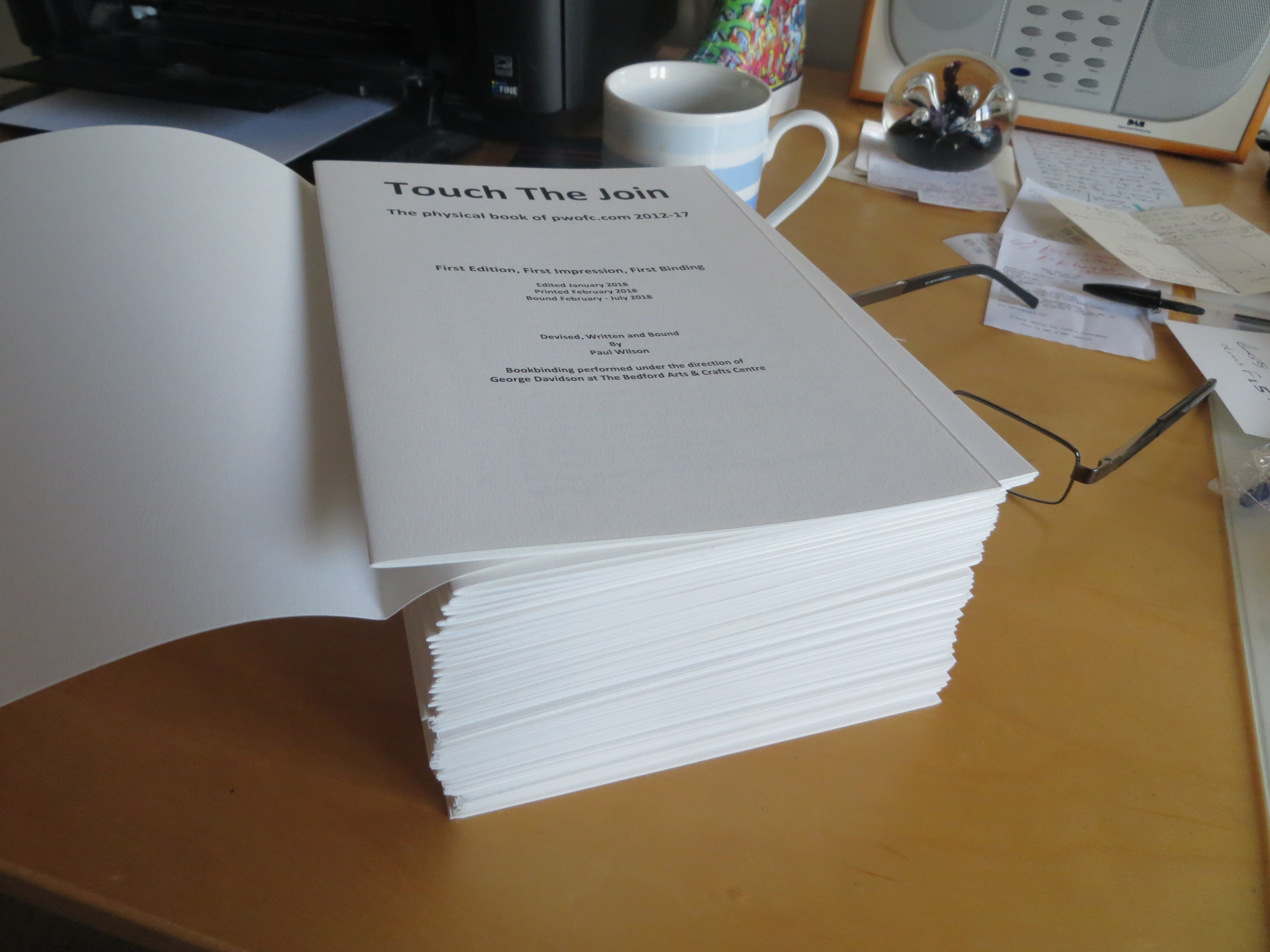
This morning I finished printing the 52 sixteen page sections (four A4 pages printed landscape and double sided and then folded in half) and what a pile they make – just over 9cm.

Unfortunately, the 100 gsm paper I was hoping to have used would have shown the text through from the reverse of the page. Instead, I ended up with 130 gsm paper which is normally sold in large sheets, but which George Davidson’s supplier kindly cut down to A4. I got 250 sheets for £15 which is a really excellent price, and which gave me a 42 spare page cushion in case things went wrong in the course of printing – which, of course, they always do. In this case, I had four hiccups:

  • It seems that images in PNG format upset the printing of documents using Bookfold page setup. They cause  adjacent text to be printed on the other half of the page. I wasn’t aware of this problem and was only able to confirm that was the cause when I replaced the PNG image with the same image in JPG format. The first time it happened I had to reprint all four pages. After that I was careful to check in Print Preview mode and was able to fix two other instances without wasting any paper.
  • I used about two and a half Canon 3550 ink jet cartridges in the course of the print, and because the printer can’t provide an accurate indication of when the ink is about to run out, I elected to just print until the quality deteriorated. This happened twice so on those occasions I lost at least two or more sheets of paper.
  • One of the Appendices was a document with a contents page in which the page numbers had been automatically generated. No problem had been apparent when I edited this page, however when this page printed it produced extra lines stating ‘Error! Bookmark not defined’ for the last 4 items on the contents list. This had a knock-on effect on all subsequent pages and extended the printing of this section onto a seventeenth page. Fixing the problem was simply a matter of removing all the page numbers from this Contents list and reprinting – however, I lost four pages in the process.
  • The final cause of paper wastage was typical human error: I decided I would print a later section while trying to fix one of the problems already mentioned; and the distraction of trying to find a solution caused me to lose track of where I was up to and to print the same section twice – another four pages down the swanee.

Anyway, despite these problemettes, I still ended up with 12 spare pages; but it is a salutary reminder that it is essential to have a good supply of spares (paper and ink) when embarking on a substantial print run.

In the course of this exercise I’ve learnt a lot more about the Bookfold Page Setup in Microsoft Word and how to manage its printing. As already mentioned, with Bookfold selected, Word enables you to create text on pages which are half the width of a landscape A4 page. It is possible to create all the pages in a single file and to use Page Setup to specify how many pages each section/booklet should have (each section/booklet is sewn separately into the book’s text block).  However, I prefer to have my sections in separate files because a) I haven’t been able to get the printer I use to do duplex printing successfully when using the Bookfold Setup – the reverse pages are printed upside down (the solution is described below); and b) I find it easier to manage the edit and print processes in small chunks, despite the need to ensure continuity of text and page numbers from one file to another.

To print with the Bookfold Page Setup I’ve been using the standard settings that come up (Print All, A4 etc.) with the exception of specifying the following settings in the print dialogue boxes:

  • Manual duplex
  • Preview before printing
  • Orientation – Landscape
  • Print quality – High

On selecting ‘Print’ this arrangement results in a preview window being displayed which allows you to view the front side of each of the four pages. If there appears to be a problem this is the point to Cancel out and to take whatever remedial action is required. However, if all looks good, selecting ‘OK’ will result in the front side of the four pages to be printed. This is the point at which you need to enact the manual duplex procedure: take the four pages out of the printer and place the top page on one side at the bottom of a new pile. Take the next page and place it on top of the new pile. Do the same for each of the third and fourth pages. Then place the new pile, facing in the same direction, into the page feeder tray and press OK on the dialogue screen shown below.

When the reverse sides of the pages have been printed take them from the printer and place the top page on one side at the bottom of a new pile. Take the next page and place it on top of the new pile. Do the same for each of the third and fourth pages. If you take the new pile and fold it over you should find that the 16 pages are in the correct order. I’m constantly amazed that this does actually work – but it really does.

Specifying ‘Preview Before Printing’ provides a valuable opportunity to check that all is well before committing to the print run. Unfortunately, the Preview only displays the front sides of the pages, so that a problem on the reverse of the pages could waste a lot of paper. However, this can be avoided by checking the Preview of the reverse sides before setting the print run going. If a problem is spotted, the print can be cancelled and the problem fixed. Then, with the problem-free front pages in the paper feed tray, the whole print run can be started again but, this time, the front side print should be cancelled in the main Print screen. However, the ‘remove the printout’ dialogue box will still be present and pressing OK will result in the Preview and Print screens for the reverse pages being displayed. Accepting these print options will result in the reverse pages being printed on the back of the problem-free front pages.

Each of the sixteen-page sections took about 10 minutes to print provided no problems were encountered. After each section was produced it was carefully folded and the crease pressed in. Now the bookbinding work starts with the pricking out of the holes for the thread which will sew the sections together. It’s going to be fascinating to see how such a large number of pages can be turned into a viable book.

Principles, Assumptions, Constraints, Risks

The export utility to move the PAWDOC files out of the Fish document management system and into files residing in Windows Explorer folders, has been completed by the Fish supplier, m-Hance. Broadly speaking, it will deliver files with a title which starts with the Reference Number; then has three spaces followed by the file description that I originally input to Fish (truncated after 64 characters); and ending with the date when the file was originally placed in Fish. I have already received the utility documentation which provides full instructions of how to install and run it and am confident I know what to do. So all that remains is for me to receive the utility (which I expect early next week) and to give it an initial test run on the PAWDOC collection in Fish.

I’ve already created a full draft of the Project Plan Description document and the Project Plan Chart, so the test run will inform me of any final changes that I need to make to the plan. After that, all that will be left to do is to fix an overall start date and then to insert the start and end dates for each task.

One part of the Project Plan Description that was of particular interest to construct was the section on Principles, Assumptions, Constraints and Risks. Since some of them really require expert digital preservation knowledge and experience – commodities which I don’t have – I’ve sent these out to my colleagues Matt Fox-Wilson, Jan Hutar, and Ross Spencer in the hope that they will let me know of any serious errors of judgement that I may have made. The text of the section I sent them is shown below:

Principles

The Principles below have been followed in the construction of this Project Plan, and will be applied throughout the performance of the project:

  • No action will be taken which will increase the cost or effort required to maintain the collection
  • Backup, disaster recovery and process continuity arrangements are considered to be significant factors in ensuring the longevity of a collection and will therefore be included as an integral part of this preservation project plan.
  • All Preservation actions on individual document files will be undertaken after the files have been transferred out of Fish into stand-alone files in Windows folders, so that a substantial number of transferred documents will be subjected to detailed scrutiny thereby improving the chances of identifying any generic errors that may have occurred in the transference process.

Assumptions

The Assumptions below have been followed in the course of constructing this Project Plan.

It is assumed that:

  • The analysis of the files remaining in Fish after the ‘Export and Delete’ utility has been run, will take no longer than three weeks elapsed time.
  • There is no publicly available mechanism to convert Microsoft Project (.mpp) files earlier than version 4.0.
  • There is no publicly available mechanism to convert Lotus ScreenCam (.scm) files produced earlier than mid 1998.
  • Application and configuration files that were included in the collection do not need to be able to run in the future as they do not contain content information. The mere presence of the files in the collection is sufficient.
  • The zipping of a website is currently the easiest and most effective way of storing it and providing subsequent easy access.
  • Versions of Microsoft Excel Word from 1997 onwards are not in immediate danger of being unreadable and therefore require no preservation work. Earlier versions are best converted to the latest version of Excel that is currently possessed – Excel 2007.
  • Versions of Microsoft Word for Windows from 6.0/1995 onwards are not in immediate danger of being unreadable and therefore require no preservation work. Earlier versions, including those for Macintosh, are best converted to the latest version of Word that is currently possessed – Word 2007.
  • Versions of Microsoft PowerPoint from 1997 onwards are not in immediate danger of being unreadable and therefore require no preservation work. Earlier versions, including those for Macintosh) are best converted to the latest version of PowerPoint that is currently possessed – PowerPoint 2007
  • None of the versions of HTML, including those pre-dating HTML 2.0, are in immediate danger of being unreadable; and therefore no preservation work is required on any of the Collection’s HTML files.

Constraints

This project may be limited by the following constraints:

  • Some of the disks and zipped files in the collection contain huge numbers of files of various types and organised in complex arrangements. To address the preservation requirements of these particular items could delay the project indefinitely. Therefore no attempt will be made to undertake preservation work on these items; but, instead, a note will be included in section 3 of the Preservation Maintenance Plan (Possible future preservation issues).
  • Disks that can’t be opened must remain in the Collection in physical form only.
  • No automated tools are available for undertaking conversions of large numbers of files; and the use of macros has been discounted as being too error-prone and risky. Therefore, all the Preservation work defined in this Project Plan has to be undertaken manually by a single individual.

Risks

There is a risk that:

  • The Zamzar service may be unable to convert some of the files submitted to it, despite tests having been completed successfully.
    Mitigation: record the need to take further actions on specified files in the future, in section 3 of the Preservation Maintenance Plan
  • The analysis of the files remaining undeleted after the Fish file export has taken place, may throw up unexpected issues and may take much longer than anticipated. Mitigation: After two and a half weeks work on this activity, the issues will be recorded in a document, and the need to address the issues in the future will be recorded in section 3 of the Preservation Maintenance Plan.

The slog of the blog book

I’m pushing ahead with the book of the blog. Having established a cut-off date for the end of 2017, I made sure that I cleared away two of my long-standing journeys (OFC and Roundsheet) by the deadline, and ended up with about 350 pages of blog posts. That’s when the grind really started and I had to go through all of them, separating them into 16 page sections ready for bookbinding. As I went through I was ensuring that the background documents accessed from links in the blog were reproduced in full in an Appendix. This was a major exercise which eventually produced a further 465 pages – all of which in their turn had to be separated into 16 page sections.

I now have 52 separate sixteen page sections, and another final section which is growing as I edit each section one last time and assemble the index and the timeline (a list of post titles in date order). In this final edit I’m also ensuring that the cross-post links and the links to Appendix documents are all consistently formatted and include the correct page number to elsewhere in the book. I decided to do this because it is the effortless ability to jump between links, and the absence of any particular space constraints, that distinguishes electronic systems from paper books – and I have taken advantage of both features extensively in the blog. So, when I decided to reproduce the blog in book form, I was determined to try to match those capabilities to the greatest extent I could. Hence, ALL the background documents have been included; and every cross reference includes a page number that goes straight to the relevant content. The only links that don’t have a page number reference are those to material elsewhere in the net which is produced by other people – I rationalised that a blog book should only include material produced by the owner of the blog.

The inclusion of linking page numbers and the creation of the index and timeline are making the final edit a slow process which may take a couple of weeks. In the meantime, I’ve been thinking about the type of paper I should use to print the book. Having assembled all the text, I can see that, if I used the same paper as I used for the ‘Sounds for Alexa’ book, the text block would be 5.5 times the thickness of the Sounds book – some 8.25 cm – a huge tome. The Sounds book was printed on 125 gsm paper, so I tried looking on the net for some thinner bookbinding paper but had no success – specialist A4 bookbinding papers sold in packs as opposed to single sheets, seem to be few and far between and I didn’t come across any that were thinner than 125 gsm. I discussed this with George Davidson, my tutor on the Bookbinding course at the Bedford Arts and Crafts Centre, and he said he would investigate a 100 gsm paper with one his regular suppliers and suggested that it might be feasible to buy a paper in larger sheets and cut them down to A4. In the meantime, I will continue to plough through the final editing of the 50+ sections.

A cursory tour of web archiving

Web archiving isn’t a simple proposition because not only do web sites keep changing, but they also have links to other sites. So, I guess I should have expected that my search for web archiving tools would come up with a disparate array of answers. It seems that the gold-plated solution is to pay a service such as Smarsh or PageFreezer to periodically take a snapshot of a website and to store it in their cloud. The period is user-definable and can be anything from every few hours to every month or year. Smarsh was advertising its basic service at $129 a month at the time of writing.

A more basic, do-it-yourself facility, is the Unix WGET command line function for which a downloadable Windows version is available. This enables all sorts of functions to be specified including downloading parts or all of a site, the scheduling of downloads etc.. However, as you might expect with a Unix function, it requires the user to input programming-type commands and to be aware of a large number of specifiable options.

More limited services such as Archive.is are available to capture, save and download individual pages – and some of these are free to use.

Regarding formats in which web archives can be saved, the Library of Congress’ preferred format is the ISO WARC (Web ARChive) file format. However, I was unable to find any tools or services which purport to store files in this format: it sounds like WARC is being used in the background by large institutions who are trying to preserve large volumes of web content. Interestingly the web hosting service I use for the this blog actually offers backups in various forms of zip files; and indeed, it is zip files that I have used in the past to store web sites that are included in my document collection.

Based on this very quick and certainly incomplete tour of the topic of Web Archiving, I’ve decided I won’t be trying to do anything fancy or different in the way I use technology to archive my old web sites. The zip format has worked well up to now and I see no reason to change that approach. As for a non-technological solution to web archiving, the notion of creating and binding a physical book of the first five years of this OFC web site is becoming more and more attractive. There’s something very solid and immutable about a book on a bookshelf. I’m definitely going to do that, and have set the end of 2017 as the cut-off date for its contents – I’m busy trying to make sure that the Journeys are all at appropriate stages by the 31st December.

Final Planning underway

Since about last April, I’ve been planning various aspects of the project to preserve my PAWDOC document collection.  This has included:

  • Deciding what to do with zip files
  • Analysing problem files identified by the DROID tool
  • Figuring out how to deal with files that won’t open
  • Investigating all the physical disks associated with the collection including backup disks

All of this work has now been completed, and a clear plan identified for each individual item that requires some preservation work.

In parallel, I have been exploring the possibility of moving the collection’s documents out of the Document Management System it currently resides in (Fish), to standard windows application files residing in Windows Explorer folders. This has included detailed planning of the structure of the target files, and of the process that would have to be undertaken to achieve the transformation. The Fish supplier has recently told me that a utility to undertake this move is now available, and I have confirmed that I want to go ahead with this approach. We are now entering a phase of detailed testing and further planning to verify that this is a viable and sensible way forward. Should no significant obstacles be identified, I anticipate being ready to undertake the move out of the Fish system sometime in January 2018.

Since the bulk of the planning work has now been completed, it has been possible to assemble a draft Preservation Project Plan CHART which itemises each piece of work that will be required. Using this is a base, and incorporating the outcome of the work on the utility with the Fish supplier, I shall start to assemble the overall Preservation Project Plan Description document, and to allocate timescales and effort to each task on the plan.

Dealing with Disks

One very specific aspect of digital Preservation is ensuring that the contents of physical disks can be accessed in the future. I found I had four types of challenges in this area: 1) old 5.25 and 3.5 disks that I no longer have the equipment to read; 2) a CD with a protected video on it that couldn’t be copied; 3) two CDs with protected data on them that couldn’t be copied; and 4) about 120 CDs and DVDs containing backups taken over a 20 year period. My experiences with each of these challenges are described below:

1)  Old 5.25 and 3.5 disks: I looked around the net for services that read old disks and I eventually decided to go with LuxSoft after making a quick phone call to reassure myself that this was a bona fide operation and the price would be acceptable. I duly followed the instructions on the website to number and wrap each disk, before dispatching a package of 17 disks in all (14 x 5.25, 2 x 3.5, 1 x CD). Within a week I’d received a zip file by email of the contents of those disks that had been read and an invoice for what I consider to be a very reasonable £51.50.  The two 3.5 disks and 1 CD presented no problems and I was provided with the contents. The 5.25 disks included eight which had been produced on Apple II computers in the mid 1980s and these LuxSoft had been unable to read. I was advised that there are services around that can deal with such disks but that they are very expensive; and that perhaps my best bet would be to ask the people at Bletchley Park (of Enigma fame) who apparently maintain lot of old machines and might be willing to help. However, since these disks were not part of my PAWDOC collection and I didn’t believe there was anything particularly special on them, I decided to do nothing further with them and consigned them to the loft with a note attached saying they could be used for displays etc. or destroyed. Of the six 5.25 disks that were read, most of the material was either in formats which could be read by Notepad or Excel, or in a format that LuxSoft had been able to convert to MS Word, and this was sufficient for me to establish that there was nothing of great import on them. However, one of 5.25 disks (dating from 1990), contained a ReadMe file explaining that the other three files were self-extracting zip files – one to run a communication package called TEAMterm; one to run a TEAMterm tutorial; and one to produce the TEAMterm manual. Since this particular disk was part of the PAWDOC collection (none of the other 5.25 disks were), I asked LuxSoft to do further work to actually run the self-extracting zips and to provide me with whatever contents and screen shots that could be obtained. I was duly provided with about 30 files which included the manual in Word format and several screen shots giving an idea of what the programme was like when it was running. LuxSoft charged a further £25 for this additional piece of work, and I was very pleased with the help I’d been given and the amount I’d been charged.

2) CD with Protected Video files: This CD contained files in VOB format and had been produced for me from the original VHS tape back in 2010. The inbuilt protection prevented me from copying them onto my laptop and converting them to an MP4 file. After searching the net, I found a company called Digital Converters based in the outbuildings of Newby Hall in North Yorkshire which charged a flat rate of £10.99 + postage to convert a VHS tape and to provide the resulting MP4 file in the cloud ready to be downloaded. It worked like a dream: I created the order online, paid the money, sent the tape off, and a few days later I downloaded my mp4 file.

3) CDs with protected data: I’d been advised that one way to preserve the contents of disks is to create an image of them – a sector-by-sector copy of the source medium stored in a single file in ISO image file format. This seemed to be the best way to preserve these two application installation disks which had resisted all my attempts to copy and zip their contents. After reading reviews on the net, I decided to use the AnyBurn software which is free and which is portable (i.e. it doesn’t need to be installed on your machine – you just double click it when you want to use it). This proved extremely easy to use and it duly produced image files of the two CDs in question in the space of a few minutes.

4) Backup CDs and DVDs: The files on these disks were all accessible, so I had a choice of either creating zip files or creating ISO image files. I chose to create zips for two reasons: first, I wanted to minimise the size of the resulting file and I believe that the ISO format is uncompressed; and, second, on some of the disks I only needed to preserve part of the contents and I wasn’t sure if that can be done when creating a disk image.

Having been through each of these 4 exercises, there are some general conclusions that can be drawn:

  • The way to preserve disks is to copy their contents onto other types of computer storage.
  • The file size capacities of old disk formats are much smaller than the capacities of contemporary computer storage formats. For example, none of the 5.25 disks contained files totalling more than 2 Mb; the CDs contain up to about 700 Mb; and even the DVDs contain no more than 4.7 Gb. In an era where 1Tb hard disks are commonplace, these file sizes aren’t a problem.
  • There are three stages in preserving disk contents; first, just getting the contents from the disk onto other storage technology; second, being able to read the files; and third, should the contents include executables, being able to actually run the programs.
  • The decision about whether you want to achieve stages 2 or 3 will depend on whether you think the contents and what they will be used for, merit the extra effort and cost involved. In the case of the 5.25 disk containing TEAMterm software described above, providing a capability to run the application would have involved finding an emulator to run on my current platform and getting the programme to work on it. I judged that to be not worth the effort for the purpose that the disk’s contents were being preserved for (to be a record of the artefacts received by an individual working through that stage of the development of computer technology).

Listening to New Stuff with Alexa

Back in February, I reported on my attempts to get Alexa to play the albums in our music collection. I’d found the following:

Coverage: about 80% of our albums were present in the Amazon Music Unlimited library.

Specifying Discs and tracks: for albums consisting of more than one disc, there appears to be no way of specifying that Alexa should start playing Disc 2 as opposed to Disc 1; and, similarly, there’s no way of getting Alexa to play a particular track number.

Voice Recognition: Alexa couldn’t recognise about 10% of the Artist/Title combinations even though I had checked that they were actually available in Amazon’s Music Unlimited library.

Since then I’ve been using Alexa and Amazon Music Unlimited to listen to newly issued albums reviewed in the Guardian/Observer newspapers, and now have a further substantial set of experience to compare with my original findings. The first thing to say is that being able to listen to complete albums, as opposed to just samples of each track from Amazon on my laptop (as I have been doing previously), is, obviously, a far more rewarding experience; and to be able to listen to a range of new releases from start to finish, regardless of whether or not they suit one’s innate preferences, is a real luxury. Most I will never listen to again – and some I have cut short because I really didn’t like them; but there are a few which I’ve really liked and have made a note of at the back of our ‘Sounds for Alexa’ book. At least I now feel a bit more in touch with what sort of music is being produced these days.

Now, to get back to the topics I covered in my earlier findings; below are my further observations on each of the points:

Coverage: Since last February I’ve checked out eleven lots of review sections comprising write-ups of 121 albums. Fourteen of these albums were issued in CD format only, and all the other 107 albums were available in Amazon in MP3 format. All but nine of these 107 were advertised as being available for streaming or available to ‘Listen with your Echo’ (the latter being the Alexa device); and of these nine, six did actually play through the Echo device.  Of the three that didn’t, two would play only samples (Bob Dylan’s ‘Triplicate’, and The Unthanks’ ‘The songs and poems of Molly Drake’); and for the other one (Vecchi Requiem by Graindelavoix/Schmetzer) Alexa repeated “Vecchi Requiem” perfectly but said she was unable to find any album by that name. Given that only three items were actually unavailable, I conclude that a lot of the new albums that are being issued in digital format are available in the Amazon Music Unlimited service.

Specifying Discs and tracks: It still appears to be the case that it’s not possible to specify that Alexa play the 2nd disk in a two disk album, nor to play a particular track number. To get round the multiple disks problem, a number of people in the Reddit noticeboard suggest creating a playlist in which the two discs are listed separately. As for the track number, Alexa will step through the tracks if you keep saying ‘next track’; but, if you really do want a particular track played, the best way to achieve that is to use the name of the track when requesting it – both of the following worked for me:  ‘Play Kashmir by led Zeppelin’ and ‘Play Cromwell by Darren Hayman’.

Voice Recognition: Of the 121 albums I checked out, Amazon claimed that 98 of them were available to play through the Echo, whereas, in fact, I could only get 85 of them to play. For eleven of the other thirteen albums, Alexa just couldn’t understand what I was requesting; and in the remaining two cases, Alexa a) insisted on playing “Rock with the Hot 8 Brass Band” instead of “On the spot” by the Hot 8 Brass band, and b) played Mozart‘s Gran Partita by the London Philharmonic instead of by the London Symphony Orchestra. Turning to the 85 albums that did play through the Echo, it was significant that only 59 of them played at the first time of asking. For the other 26, I had to repeat the request at least twice and as many as six times (these details are included in this Recognition Analysis spreadsheet). Naturally I was trying out all sorts of combinations of all or part of the particular album title and artist. After much trial and error I have taken to first asking for both the album title and the artist (play me X by Y); then, if that doesn’t work, to ask for the album title on its own (or even just parts of the album title – for example, 1729 for the album title “Carnevale 1729”). Finally, as a last resort, to just ask for the Artist. This strategy proved successful in all but 3 of the 26 instances that didn’t play at the first time of asking. These figures indicate that Alexa’s voice recognition capabilities haven’t improved much since my last write-up in February. This view is reinforced by my (undocumented) experiences of trying to get Alexa to tell me about various golf, rugby and cricket events. Her responses have usually been either about a completely different event or just that she doesn’t know. Perhaps I’m not asking the questions in the right way….. at least Alexa is usually able to provide a weather forecast at the first time of asking. In her defence, I should mention that my son seems to have no trouble in adding all sorts of outlandish things to our Alexa shopping bag (which, I should add, we don’t use – Alexa just provides it if you want to put things into it).

From this summary of my recent experiences with Alexa, it seems that little has changed. Whilst Alexa’s voice recognition capabilities don’t seem to have improved much, the usefulness of the device compared with having stacks of CDs around, is undiminished. So much so, in fact, that we have replaced our last remaining CD player, which was in the conservatory, with  another Echo device; and we’ve upgraded to Amazon Music Unlimited for 10 devices at £9.99 a month.

There are undoubtedly many other uses that we could be putting Alexa to – the weekly email from Amazon always suggests several new things that one can ask her or get her to do. We haven’t really followed any of them up. Perhaps I’ll get to printing out the email each week and putting it next to the echo as a prompt. Or maybe I won’t  – we’ll see.  One thing’s for sure: what with all our CDs in the loft, and no stand-alone CD player, Alexa is going to be with us for the indefinite future.