
Plans for Year Files

We have Year Files into which Su and I put material which we want to keep but for which there is no other obvious place for it to go. It’s a handy system which serves two purposes: it’s a short term store for things you might want to refer to in the next few years such as receipts, and it’s a long term store for mementos. However, as the years go by the storage space required increases relentlessly. We are now on our seventh box in the loft – below is an example of one of them.

Example of Year Files

As well as requiring storage space, there are several other disadvantages of keeping the material in this way:

  • it’s relatively difficult to access,
  • a lot of the material is generally invisible and often gets forgotten about,
  • if we move house it will add to the removal effort and cost,
  • if we move house there may not be sufficient storage space available to take it,
  • such a great pile of material may be more of a problem than a joy for those who inherit it.

To try and address these issues, we’re going to go through it, throw away unwanted material, digitise where appropriate and make visible the things we want to enjoy. The lessons learned when assembling the photobook of work experiences can be applied – particularly the approach to uncovering what we really want to achieve with each set of material and how to turn those desires into reality. As we work through it, I’ll be reporting on what we experience with each different set of material.

Sadly, the one unique feature of the Year Files will be lost – the ability to traverse a year chronologically through all its activities, family mementos, major events, and trivia. However, that’s a pleasure that, in practice, is not in great demand. In any case, once the material has been transformed, perhaps a future piece of work could explore how to re-create that experience on demand.
A problem with Alerts

In the last 5 days I’ve received five messages from BIT:

  • three alert messages giving advance notice of various papers accepted for BIT;
  • a message announcing the 2nd issue of BIT for 2013;
  • and another message announcing the 3rd issue of BIT for 2013.

Since I didn’t deal with them all immediately, I now find myself having to do a relatively substantial amount of work all at once. It would have been much better if these emails had been spaced out a little more. It certainly seems undesirable and unplanned to notify users of two whole issues of BIT within 4 days of each other. I presume that it was caused by problems in the production process. However, my view is that, as a matter of policy, notification of new issues should be spaced as far apart as possible.

Neither of the two issues contained papers I had already previously seen through the alerting process, so I reviewed their contents on screen – first checking the abstracts and then the full text if they looked interesting. As noted before, this experience was fine.

However, checking the alert messages was a little less satisfactory. Because several alert messages are sent out for the same paper as it goes through its reviewing and acceptance cycle, I wanted to establish if I had already checked a paper before spending time on reading it again. I’ve worked out that you can identify papers new to the alerting cycle by looking at the publishing history at the beginning of the paper. Basically, if it has more than one Posting/Publishing entry then one can assume an alert has previously been sent out. If this was the case, I double checked all the previous alert messages (stored in my mail system) that I had received. Once reassured that I had already seen the paper I was able to discount the alert and store the email. For the papers I had not already seen, I reviewed them in the same way as described above i.e. read the Abstract and then, if interested, downloaded and scanned/read the full text.

My current feeling is that the alerting process doesn’t quite meet my needs. I haven’t properly thought it through yet, but I suspect I would prefer to be able to specify my alerting requirements at a much finer level of detail i.e. for each of the standard stages in the reviewing and publishing cycle. I know that my choice would be to only get alerted the very first time a paper is made available online. I don’t believe such granular selection options are currently available.

One other thing has happened in the last week: as a result of a conversation between Dave O’Neil (the Chief Exec of the Institute of Ergonomics and Human Factors) and Taylor & Francis (the publisher of BIT), I now have online access to all back issues of BIT. So I am proceeding to download those issues referenced in my filing system, prior to then trying to find a home for all my hardcopy  issues of BIT.

Reflecting on the poster management exercise

Digitising all the posters, pictures, paintings and artworks has certainly been a useful exercise. It has:

  • enabled unwanted physical items to be thrown away;
  • prompted the permanent display of some paintings that had hitherto been stored away;
  • given visibility to items normally stored away from view, using free standard issue Windows 7 software;
  • prompted the purchase of a frame to rotate pictures through;
  • prompted the flat storage of some items that had hitherto been rolled up in cardboard tubes;
  • provided a digital record of our paintings of value for insurance purposes should that ever be required.

Since the numbers of items involved (in this case around 80) is relatively low, the whole exercise didn’t take long to do. However, as with all other digitising activities, dealing with a large backlog of material is always much more daunting and time consuming than simply doing it bit by bit as you go along. Now that the initial job has been done, the challenge will be to maintain the digital collection as new physical items are added and other items removed.

Displaying and rotating the physical posters

For displaying the physical posters, I decided to rotate them in a single frame and to store the bigger ones at the rear of the frame. I never got to see a Snap frame (which allows the front to be opened) and instead purchased a large 36 x 24 inch beech frame from the Frame Company for about £34 and £7 next day postage.  The backboard is secured to the edge of the frame by folding down 4 or 5 metal strips along each side, and I figured these would be flexible enough to accommodate the thickness of the 6 or 7 posters I wanted to store in the frame. This turned out to be the case – with enough room for a few more if necessary.

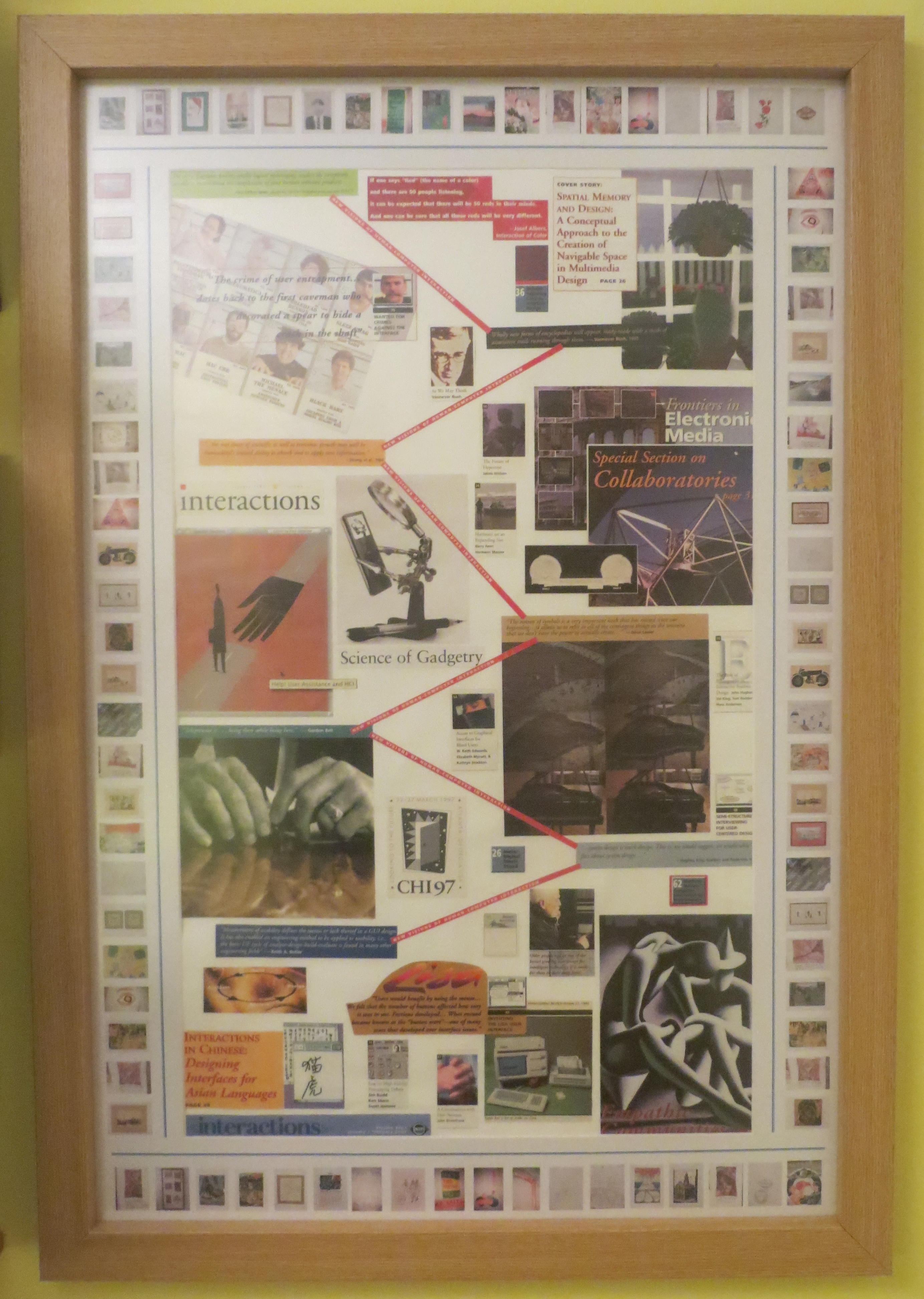
I duly constructed the montage I had been planning out of the colourful 10-20 year old covers of “Interactions” – the ACM magazine for the discipline of Human Computer Interaction (having scanned their contents it seemed a waste to just throw the covers away). The resulting 30 x 18 inch collage is quite informative and interesting but not particularly pleasing to the eye. Ah well, you can’t win them all. Anyway, at least it did provide a focal point and incentive for obtaining the frame – and it will only be on display some of the time as it takes its turn in the rotation of the posters and pictures through the frame – provided I do actually perform the rotation – only time will tell.

I didn’t really explore the use of Snap front loading frames for the reasons of cost, looks, the lack of any product to look at, and not being able to understand how multiple posters could be held securely (ie. without slipping down) while being stored behind the picture being displayed. Having said that, and despite my desire to try out storing posters/pictures at the back of a frame for rotation,  I do believe that probably the best way to store most posters and pictures is in a large art case – provided you can get one big enough to take the largest size poster that you have.

To emphasise the point that the purpose of the frame I have purchased is to rotate posters and pictures through it, thumbnails of all the posters and picture not on permanent display in the house, have been printed out and glued around the edge of the mount in the frame. In principle, one could select from the thumbnails, which poster or picture to display next in the frame. Although the net result is quite busy as you can see below, it does do the job. Perhaps it would look better with something other than the collage on display in the middle of the frame.

Digitising the Posters and Pictures

The digitising exercise has been very rewarding. All the posters, paintings and drawings in the house – some 80 or so items – have been reviewed and photographed. Some of the ones that had been in storage in the loft or elsewhere have been framed and put up on the walls. Items of more sentimental interest than physical value (such as graffiti on large wall sheets from parties held long ago) were photographed and thrown away.

Photographing the items proved relatively easy and quick to do using a modern digital camera and a white background, though two pitfalls were encountered. First, you have to be careful not to tilt the camera when above the picture otherwise the picture does not appear rectangular in the photo. Second, reflections are difficult to exclude when photographing framed pictures under glass. Despite these problems, however, the digital images are pretty good, so I turned my attention to using them to make the posters and pictures more visible in three different ways:

First, I put all 80 odd images into a single folder and specified that they be displayed in slideshow mode as the desktop background of my Windows 7 laptop.

Second, I specified that they be displayed as a slideshow as a screensaver in my Windows 7 laptop. I[ could also have specified that they be displayed as  within the Windows 7 Slideshow Desktop Gadget which appears as a small window  on the desktop – but I considered that to be overkill. Instead I use the Slideshow Desktop Gadget to display all the images in the My Pictures folder – very effective].

Third, I printed out thumbnails of each of the images not currently on permanent display in the house, to go around the edge of the physical frame that I’ve bought – more of this in a subsequent entry on displaying the hardcopy posters.

The net result is that the posters and pictures are all now highly visible – I see them everyday as I use my laptop. They are almost too visible, so at some point I may just display them in either the desktop background or the screensaver. However, the objective of making them more visible has certainly been achieved. Its to be noted that all three functions I’m using – Desktop Background, Screensaver and Slideshow Desktop Gadget – are all free pieces of software that come bundled with Windows 7.

We need an ORI mark system

As I contemplated the display of digital versions of posters and pictures, my mind wandered to other aspects of digitisation such as the creation of objects with 3d printers. The slippage between real and digital will become increasingly easy and prevalent. Consequently the world of the future will need ways to easily, quickly and reliably differentiate between what is original and what is copy – an ORI mark system. Detailed forensic investigation will always be an option to get an absolute answer, but people will need a more immediate mechanism to help them navigate an increasingly mixed reality world.

An initial look at physical frames

In researching physical frames that are currently available I came across the following:

  • Movie poster frames that are front loading i.e. you don’t have to take them down from the wall to change the poster that’s being displayed. Around $85 for a 27 x 41 inch frame from http://www.spotlightdisplays.com
  • In the UK, front loading frames for business are known as ‘snap’ frames. An A0 (23 x 33 inches) snap frame costs around £30 from http://www.tradeframes.co.uk. A 27 x 41 inch silver snap frame costs £35 (on offer) from http://www.sign-holders.co.uk
  • There are also swinging display racks in which you can have instant access to a large number of pictures. However these tend to be quite expensive. For example, a 50 picture system costs $695 from http://www.clevelandskyline.com
  • I also came across variety of possible products in Staples including a Nobo flip chart board which you could use to suspend pictures on (somehow) at around £60; a Cork board (600 x 900 mm) at £44; an A1 clear presentation slip case at £5.50, and an A1 presentation case.
  • A standard frame of 36 x24 internal dimension, and a with a beech-type moulding measuring 40mm wide and 30mm deep, can be obtained for £33 from http://www.frame-company.co.uk/beech-36×24-frame-with-white-mount-cut-for-image-size-30x20_1.html
  • I did NOT come across any frame that also offered poster storage to its rear.

So, my conclusion after initial investigations of frames is that I need to decide between a snap frame which enables the contents to be changed while still fixed to the wall, or an ordinary frame which probably would look nicer but which would need to be taken down to change its contents. I think I’d like to take a look at a snap frame before making the choice.

The Poster and Picture Challenge

I have a variety of poster sized material stored away in tubes or rolled up in the loft. I also have smaller sized pictures stored flat in an art folder, and some acrylic paintings done on board. They are not on display because I don’t have room for them all on my walls – nor the money to frame them all.  Of course, they can all be photographed and then some of the originals could be thrown away (and I have already done just that a few years ago for quite a few of my poster sized items); but there are others that I want to keep in their original physical form. I would prefer all the originals to be stored unrolled and in an easily accessible place so that I can rotate their display in fixed picture frames already on the walls.

The solution seems to be in two parts – digitising (i.e. photographing) the posters and pictures and coming up with ways of displaying them to their best advantage; and the storage and periodic display of the physical items. To add a little immediacy to the physical display challenge, I have been planning to create a large collage for a while, and so I shall attempt to make the frame I display it in a rotating display unit suitable for displaying the other posters and pictures.The space in my study in which the frame will be mounted dictates the frame size – it cannot be bigger than 29.5 x 60 inches.

Another requirement which I’m going to bear in mind is that I’d like to be able to store artefacts and to display a subset of them at any one time. Perhaps the rotating display unit can serve this purpose as well.


Storing Large Movie Files

In the last week or so I’ve been exploring the use of video editing and conversion tools – primarily to deal with the conversion and storage of personal cine film. However, since I also have about 15 pieces of video indexed in my document management system, I decided to try and use the same tools on them. The video is all on DVDs for two main reasons. First, most of it is in DVD video format (multiple files with extensions of either VOB, IFO or BUP) which is not conducive to storing in a document management system except in a zip file; and second, up to now I havn’t had sufficient storage in my PC to cope with the sizeable volumes of video files. Both of these constraints can now be overcome. I have the tools to convert multiple DVD video files into a single MP4 file; and my current laptop has 750Gb of storage of which two thirds is currently empty.

Overall, the exercise of moving the material on DVDs into the Fish document management system has been successful. All but one item has been transferred, and all the movies play directly from Fish when selected. However, a number of experiences are worth recounting:

  • Inaccessible DVD files: One DVD was transferred from VHS video to DVD by IC Video Ltd in the same way as several of the others, However, although it usually plays OK when put into the DVD slot, neither the FreeStudio or Movie Maker software I’m using was able to convert successfully from the DVD. Indeed, I’m not even able to copy it from the DVD to my laptop.  So that material will have to stay on the DVD until I find a solution.
  • Movie file formats: I also have a number of TV programmes downloaded from the net with .MPEG extensions and which play successfully on my laptop. However, my FISH document management system does not seem to support that extension. I did try changing the extension to MP4 (which FISH does support) but found the quality was much reduced. In the end I discovered that FISH does support a .M1V extension with which the files do play successfully. This prompted me to read up about MPEG and I discovered it has many versions with .M1V predictably being MPEG1.  I don’t plan to spend a great deal of time trying to understand all about movie formats, and am just happy to have found an extension that plays on my laptop and can be stored in my document management system. However, it has reminded me that there is much greater complexity in all these standards than meets the eye and consequently I shall be keeping the physical DVDs in case I encounter problems downstream.
  • DVDs with data files: A few of the physical DVDs contain not video files but collections of ordinary files. For example, one is the installation disk for an old version of my FISH document management system. Another is the installation disk for my Home Use versions of Microsoft Word and Excel. With these I simply zipped up the files and stored the zip file in Fish.
  • Large file sizes: Although file size is no longer such a problem on the laptop as previously, it still needs to be taken into account for backup purposes. All the material in my document management system is placed into so-called ‘bins’ – standard Windows folders specially configured by FISH. Over the years I have limited the size of the bins to around 200Mb to facilitate manageability and the taking of backups. These days I’m able to backup to 4.7 Gb DVDs – though I still try and keep the bin size to around 200 MB. With these movie files, however, some of the file sizes are well over 1 Gb, so I have created specific bins for them to go in and ensured that the sum of the files within them do not exceed 4.7GB (which is the advertised size of the DVDs) so that I will still be able to take the necessary backups. Unfortunately, as I discovered when trying to burn to disk, the usable size of blank DVDs is somewhat less at 4.37Gb. Consequently, I subsequently had to move some of the files around the bins I had created to keep the bins under the 4.37Gb limit. After over 30 years of personal computing, things are still never easy….


Reading an Electronic Journal

I received notification of my first electronic-only volume of BIT a few days ago and have just finished going through it. The experience was fine. I upped the text size in my browser so it was easy to read and zipped through the papers in pretty much the same way and pace as I used to with the hardcopy. The main difference was that previously I might have gone through the hardcopy in bed and then, later, sat at my desk to index, download and store any of the papers I was interested in; whereas now I need to do all of that at my desk. It could be argued that I could read the papers elsewhere on an iPad and then go to my desk to do the indexing and storing; however, now that I’m accessing the papers directly from the web site, it seems more sensible to do the indexing and downloading as and when I’m doing the reading.

Anyway, overall the experience of receiving an electronic journal, reading it and filing papers I’m interested in, was fine – no problem. However, that is not how it will be going forward. Since I have elected to take alerts on papers as they are accepted into the journal, I will already have seen several if not all of the papers in the electronic editions of the journal that I receive in future. I will report on that after I have experienced it.