The Case of the Computing Collection

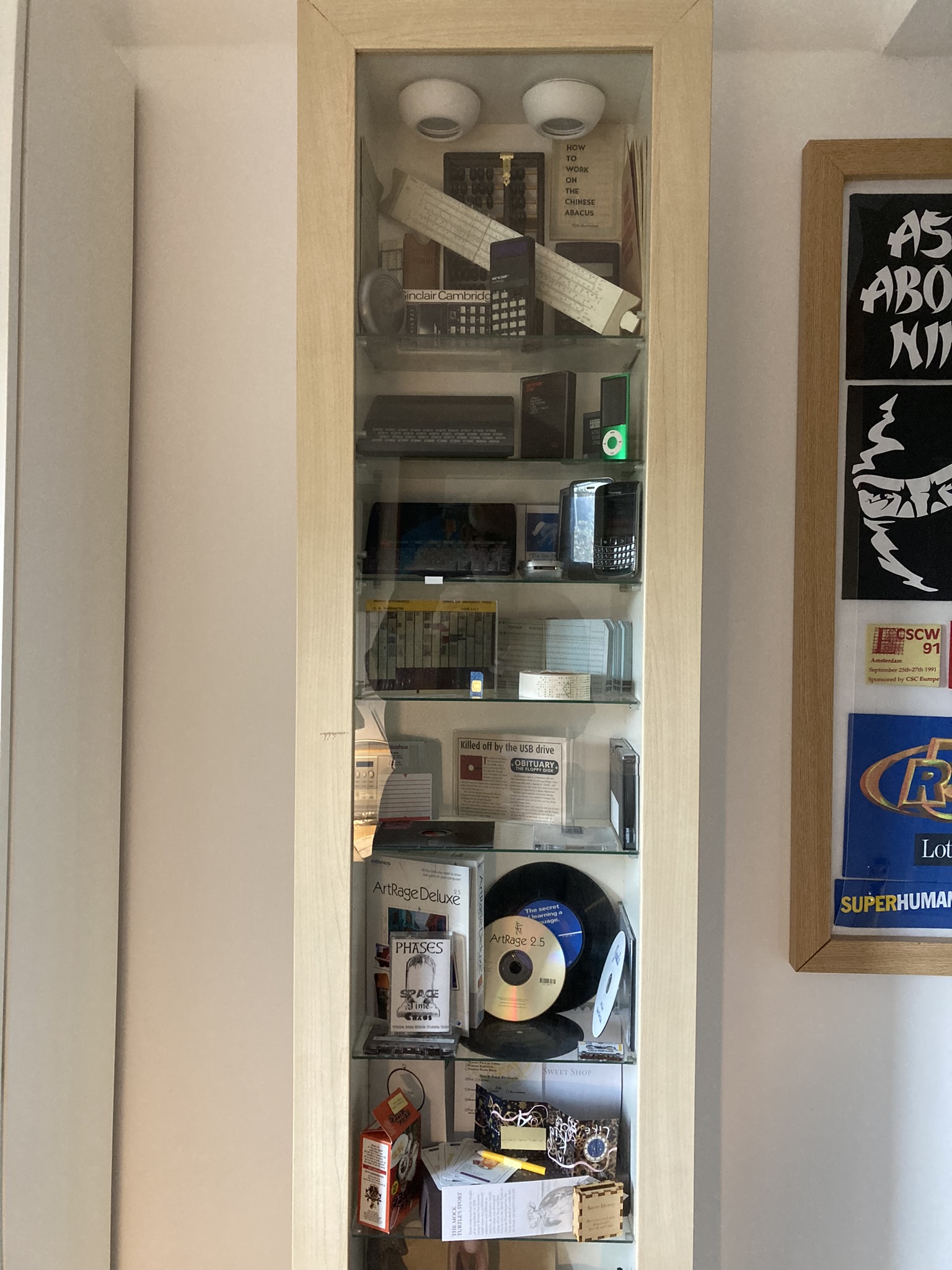
Sometime around the late 1960s or early 70s I acquired a Chinese abacus complete with instructions on how to use it. I already had a slide rule and associated log table and booklet of mathematical formulae for use by candidates of A Level Mathematics and Physics papers from the Oxford and Cambridge Schools Examination Board. Some years later, in 1981, my wife bought me a Sinclair ZX 81 for my birthday – an iconic present at the time: computers were NOT home devices in those days. It took me a few years to join the dots, but I gradually realised I had the basis of a collection of computing-oriented items, and that I was slowly adding to it as time went by with items such as floppy discs, calculators, and Personal Digital Assistants (PDAs). Once I’d cottoned on to the possibility, I remembered I also had a program on Paper Tape that I’d produced at University, and a pack of punched cards that I’d used for my final year project. The notion of a collection of computing objects became cemented in my mind; and I made sure to keep relevant objects as I replaced them in the surging wave of technology development.

However, it wasn’t until  around 2010 that I decided to actually exhibit the pieces. The notion was probably inspired by seeing various display cabinets for sale when going round IKEA.  I eventually decided I’d buy one of the units and I duly bought it, assembled it, installed it in my study in Aylesbury, and put all my computing items into it. When we moved in 2015, I took the cabinet with me and installed it in my new study as shown in the photo below.

However, by 2023 I’d run out of bookcase space, and I realised I could fit in just one extra bookcase by moving the display case  about 50cm to the right. As I started to plan this change, I realised it was a tremendous opportunity to explore how to curate 3D objects properly. I would have to remove everything from the display case in order to move it, and, as I did so, I could index every item and then explore how to mark it – a problem I had previously encountered with paper mementos and loft items. Then, putting the objects back into the display case would enable me to explore the crafts of display and description. I had also started putting non-computer objects into the cabinet, and this exercise would also enable me to investigate the challenges of mixed collections, of too little space, and of how to manage items that have to be kept in store. That is the journey I’m about to embark on.

The Bonus Challenge

Although it’s relatively straightforward to use HandBrake to convert a specific video file, I’ve found that there are further complications when it comes to dealing with a complete DVD. Very few of my DVDs have 1 single file; and many of them have 10 or more – some as many as 25+. A decision has to be made for each file as to whether or not to convert it. Unfortunately, each file is only identified by a number, though HandBrake does also provide 10 snapshot stills across each one together with its playing time. To identify what a file contains, you have to match this set of clues with the information provided on the DVD box and the DVD itself.

The ’Billy Elliot’ DVD provides a simple illustration of the elements of this challenge: the files were numbered 1 – 6 but HandBrake was only able to read 4 of them – files 4 and 5 were missing from HandBrake’s list. The file with the longest playing time – 1:45:49 – was obviously the film itself. From the HandBrake stills, I was able to see that the 2-minute file was probably a cinema trailer and the 14 second file was the Universal moving logo at the beginning of the film. The DVD box advertised the following Bonus Features: Breaking Free Featurette, Theatrical Trailer, Cast & Film Biographies, Interactual (whatever that means), and Production Notes. Since the remaining file read by Handbrake had a playing length of 00:21:36 I deduced that it was likely to be the featurette, and, sure enough, when I did the conversion, that’s what it turned out to be.

The Billy Elliot example was relatively simple. ‘Love Actually’, with 28 files being read by HandBrake was more difficult; and the Special Edition of ‘Titanic’ was like a Sherlock Holmes mystery with two Discs each containing 43 files (of which HandBrake read 41 and 38 respectively) and a DVD box specifying additional material including various commentaries, a spectacular alternative ending, and branching footage while watching the film. Of course, menus are the key navigation aids to all this material when you are watching using a DVD player; but HandBrake doesn’t pick up the menus. So, even if you converted all the files, you would still not be able to recreate the experience offered by playing the DVD. That just seems to be the hard-stop limitation of using a converter program like HandBrake. Of course, the full functionality of the DVD could be recreated if you were prepared to hand-craft code and integrate all the elements together. However, I’m certainly not prepared – or able – to do that.

There’s another factor to be take into account when deciding what files to convert: how much of this extra material is going to be looked at? I’m pretty sure I have never viewed all the extra material  provided on each of the DVDs I’ve watched; and often I’ve never watched any of it. That might be a good indicator of whether I’ll ever want to view it in the future.

Given the complications of multiple unidentified files, and my lack of general interest in ‘bonus features’, I soon decided that I was only going to convert extra material if it was properly assembled and of particular interest. So, for example, for ‘Love Actually’ I converted an extra 37-minute piece of Richard Curtis introducing bits cut out of the film; and for ‘Cabaret’ I also converted the 1972 documentary ‘The re-creation of an era’, and the 1997 documentary ‘Cabaret – a Legend in the Making’. However, for the films ‘The Holiday’, and ‘The Full Monty’, I didn’t convert anything else.

Conversion Alternatives

There are three ways of being able to watch a DVD without a DVD player: either by converting the DVD into a single software file and storing/playing it on your PC; by obtaining that software file from elsewhere and storing/playing it on your PC; or by streaming the movie from an internet service or location. Having established that conversion is a definite possibility, I thought I’d explore the other options.

I started by investigating the five DVDs which claimed to also provide a downloadable version for a limited period. In three cases, specific expiration dates were quoted (02Dec2014, 27Feb2019, and  31Dec2019) – though two of these just said that the download may not be available after the date specified. One of the remaining two specified that the download code “may expire two years after the release of the film”; and the other one simply said “redemption code subject to expiration”. Given these caveats I wasn’t very hopeful as I set about accessing the specified websites to try and obtain the digital copies.

In one case, the website specified no longer existed. In a second case the process took me to the Apple Store after which it hung and I had to abort; after two attempts I gave up and assumed the code had expired. The third one said “Sorry this code has expired”, and the fourth one proclaimed that “Support for digital copy redemption has ceased”. However, the fifth one, despite specifying the 27Feb2019 expiration date, was successful! I put in the voucher code and after confirming it was for the movie Jack Reacher – Never Go Back, it offered me just one provider option – Apple TV. I put in my Apple account info, downloaded iTunes, and, after taking me to the iTunes Store, it said the movie was being transferred to my iCloud library (though there was no sign of it when I looked). However, shortly afterwards it appeared in the Recently Added section of the iTunes app. When I clicked on it, it started to play in a new window. These results are summarised in the table below.

Movie Expiration Date Website Result
The Dark Knight Rises [2012] 02Dec2014 ultraviolet.flixster.com opens as ww7.flixstervideo.com/redeem The website has 3 options (ultraviolet technology; a video streaming app; and info about Disney Plus subscriptions). Assumed voucher had expired.
Minority Report [2002] Two years after release None specified: 2nd disc initiates a process requiring the iTunes app, and linking to the Apple Store Apple Store hung and required aborting. Assumed voucher had expired.
The Lady in the Van [2015] 31Dec2019 sonypictures.com/uvredeem opens as redeem.sonypictures.com/ Got message “Sorry this code has expired”
Jason Bourne [2016] Redemption code subject to expiration www.universalredeem.com/ Got message “Support for digital copy redemption has ceased”
Jack Reacher – Never Go Back (2016) 27Feb2019 paramountdigitalcopy.com/support/uk

opens as https://paramountdigitalcopy.com/

Put code in and it said “Select a provider” listing one option – Apple TV. I provided my apple account details, downloaded iTunes, was taken to the iTUnes store and the movie appeared in the recently added section of the iTunes app where I was able to play it

Despite being able to actually play the Jack Reacher movie, it is not a stand-alone file. It can only be played from within iTunes. When it is copied out of iTunes, DRM functions (Digital Rights Management) are introduced such that it will only play a series of static scenes. In similar fashion, Amazon applies DRM controls when it offers movies to rent or buy: for both types of purchase, access to the movie is via the Amazon Prime Video app. The files cannot be copied and moved outside the app. So, you are not actually buying the file – just access to it. I believe this is the way all internet sales of movies work; it is not legally possible to acquire the actual video file. Having said that, if you simply want to watch a movie again at some unspecified point in time, then it’s a reasonable assumption that you will be able to find a copy to rent. A quick trawl of Amazon Prime determined that 49 of the 58 titles in my collection are available for rent at prices between 99p and £3.49. I also did a check of Netflix (which provides free access to subscribers) but could find only 6 of the titles.

My conclusion from this rather cursory investigation is that for movies you might want to watch again sometime in the future then it should be possible to rent them relatively cheaply and easily; but that if long term reliable access is required, then conversion by HandBrake is the best option. It goes without saying that you should not pass a converted copy to anyone else. I, personally, always store away the originals of CDs, videos, and books that I copy, to demonstrate proof of ownership.

HandBrake Conversions

The obvious way to dispose of physical DVDs and yet still have them available to view is to convert them to digital format and to store them on a PC or hard drive. In theory, they could then not only be copied to and viewed on any device (such as a tablet or phone), but also viewed on a large screen TV via the domestic wi-fi network. To explore these possibilities, I downloaded the free open-source HandBrake video converter tool (as recommended in issue 664 of the UK ComputerActive magazine).

HandBrake complies with Digital Rights Management (DRM) legislation and so is not able to circumvent standard copy protection measures built into most movie DVDs. However, a separate piece of open-source software called libdvdcss-2.dll is freely available to overcome this problem.  This is effectively a plug-in to HandBrake and simply needs to be placed into the HandBrake program folder. I duly installed both HandBrake and libdvdcss-2.dll and set about trying to convert some DVDs.

I had a minor problem getting started as, after completing my first conversion, Handbrake seemed to be unable to read a large number of the DVDs. I eventually found that the problem was something to do with pointing to the correct file for HandBrake to inspect: I’d been selecting the “D: DVD name” entry in the Source Selection menu, and this was producing a screen announcing “No valid source or titles found”. The problem was rectified by choosing the Folder option in the Source Selection menu and then selecting the “D:DVD name” that appeared in the Windows Explorer menu. I don’t really understand why this made a difference – but everything worked fine doing it that way….

Overall, I found ndBrake very easy and effective to use. It was able to read all but one of the 54 DVDs in my collection. The one that it couldn’t handle was designed to enable the downloading of a copy of the film ‘Minority Report’ so there was actually no film on the disk for HandBrake to identify. I was unable to even try to convert any of the four Blu-Ray titles in my collection as my DVD player simply won’t read them. In the course of the exercise, I successfully converted 19 of the 54 DVDs to MP4 using the standard presets advised by HandBrake, and encountered no problems in doing so with each conversion generally taking between 20 minutes and half an hour. I shall comment on the quality of converted files later on in this process after I’ve tested viewing them on my TV.

I decided to limit the number of DVD conversions at this stage because of the time required to undertake the conversion, and because of the large file sizes being generated. The films I have converted are either ones I created to get me started with HandBrake; or ones I definitely know I want to keep; or ones that I want to see before deciding what to keep. The 19 titles I converted take up some 18.5 Gigabytes and play for a total of about 40 hours. I shall return to the question of what converted DVDs I want to keep after I’ve investigated some related issues such as whether they can be easily obtained through streaming services, whether the converted files play successfully on the TV via wi-fi; and whether the quality of the converted files is good enough.

One final note on the converting experience: I’ve had to handle the DVDs a lot during the process and this has definitely induced a sense of appreciation of their characteristics. No doubt this is partly due to the stirring of good memories of some of the films; but its not just that. These products with their different designs – triple fold overs, slip cases, multiple DVD holders, metallic casings, eye-catching graphics, special editions, and the odd booklet – do have their own kind of kudos. But I must restrain myself… we’ve decided to dispose of these physical goods and that’s that…..

Hardware considerations

A few days ago, I tried using the external DVD player that I bought to go with my laptop, to play a film on my Smart LG TV. I discovered that the DVD player only has a USB interface and that films on DVDs won’t play without an HDMI interface. So, to be able to play any of our collection of DVDs , we would have to buy an HDMI-capable DVD player which a quick search of the net determined would cost in the region of £30 – £50. Unlike my current very compact and easy-to-store external DVD drive (measuring some 14x14x1.5 cm), such beasts are larger, may employ a pop-up lid as opposed to a sliding drawer, and require an external power source. These are all factors which would affect the aesthetics of the piece of furniture on which our TV sits: it would mean accommodating an extra big black box with two lots of additional wiring for a facility that might be only rarely used – and this after having been pleased to get rid of our previous very large DVD recorder box. I guess it could be kept in a drawer and just installed temporarily when needed – but setting it up wouldn’t be easy because there is little space to get behind the 65inch TV screen to access HDMI ports and power points. Of course, such a device could also be used on my laptop – but I don’t really think I’d want to watch films on my laptop screen or even the 27-inch screen on my study desk. In fact, I wouldn’t want to watch films in my study: movie-watching is more of a relaxing lounge activity.

Many of the above factors are the reasons why we decided to dispense with a video recorder and the physical DVDs in the first place; so, I’m not really envisaging going down that route again. Nevertheless, it will be useful to have a clear understanding of all the possibilities and constraints when I get down to deciding which films, if any, I particularly want to keep and in what format.

Musings about video collections

When I saw my first movies in the late 1950s, there was no way of keeping a copy of the one’s you especially enjoyed to view again at some time in the future. This was in contrast to some of the first books which I really enjoyed in the early 1960s – such as Coral Island and Greenmantle – and which have resided on my bookshelves to this very day, available for dipping into or re-reading at will (though, truth be told, this hasn’t happened much). All this changed in the 1970s with the emergence of the domestic video recorder, and movies could be rented, and eventually purchased, on video tapes. In the 1980s, you could have a collection of films in your bookcase along with your favourite books.

Unfortunately, there was – and still is – a significant distinction between the two media: books don’t require anything else to be able to read them, whereas video films need equipment to play them on – equipment that keeps changing as the technology develops. So, my collection of films on VHS video had to be swapped into DVDs; and last year we got a new TV streaming box which doesn’t have a DVD player at all.

However, leaving aside this pesky technology problem, I’m wondering if the introduction of films to our bookshelves has truly made a difference. As I hinted above, I don’t reread books very often; and yet having them on my shelves does make a difference. I guess their presence acts as a reminder of the impressions they made on me; and their physical presence does afford me rereading opportunity, whilst their absence might fuel a desire to obtain them. Is the same true of films? Well, I think in my case – yes! The visuality and motion in films undoubtedly make them seem more attractive than a book, and may be more likely to inspire a second viewing; nevertheless, as with my books, I don’t seem to have  taken much advantage of their availability. But I would, in principle, like to have a collection of my favourite films, even if only to know what they are.

Of course, films are not the only video material that we encounter today: we also watch huge amounts of TV, some of which we really enjoy and regard as memorable. Some people recorded and had collections of such material – and then encountered the changing technology problem. In the face of today’s streaming services, only the dedicated will have managed to retain such collections in a form that Is still accessible. My wife and I, thankfully, never went down that particular rabbit hole.

There are two other types of video material that I do have collections of. One is about a dozen pieces relating to office technology developments that were relevant to my job as an IT consultant. These were included in my work filing system, converted to digital files several years ago, and continue to be maintained within the filing system under its digital preservation maintenance plan. I feel no need to have these items displayed anywhere: they are accessible via the filing system’s index in just the same way as all the other 25,000+ items in the collection. The other type is the family’s collection of cine films from the 1950s onwards, and more recent videos taken on video recorders and then on mobile phones. These are included in the family’s photo collection, and maintained under that collection’s digital preservation plan. Interestingly, we do have these items on DVDs in very thin cases and on display in our living room bookcase, so the fact that we no longer have a DVD player attached to our TV does affect the accessibility of these family records as well.

While there are numerous similarities in the motivations and practicalities associated with collecting these three different types of videos – films/TV, work, and family, I nevertheless feel that I’ve collected the work and family videos for very specific reasons, whereas the collection of film/TV videos is much more like collecting books – it is based on very subjective appreciations of the content and, importantly, whether you own the item in the first place: if you really enjoyed a book you borrowed from a library would you be likely to go out and buy a copy just to put it on your bookshelf?

This last point is critical in todays streaming world, and it applies not just to video but also to music and books. The lack of physical media when films/TV, music, and e-books are consumed mean that there is nothing physical to go on our physical bookshelves; and in the case of films/TV and music, there is not even a digital file to store on your local device. This simple fact is probably the most significant factor in our decisions about collecting films/TV and music in today’s streaming environment. It also highlights the point that most physical collections of books and films/tv exist simply because the media was purchased in order to consume it – not because you wanted to build a collection. The collection was just a by-product of the process. I shall carry this thought with me as I set about deciding what to do with my DVDs.

DVD Dilemmas

Last summer we boxed up our DVDs when we had our lounge redecorated, and there they have remained because we no longer have a video recorder to play them on. The box is taking up space in my study so the time has come when I need to something with them.


Of course, I could just take the whole lot down to a local charity shop – but it’s not going to be as easy as that. You see, mixed in among the movies that we just bought and enjoyed (like the Bourne series) are long time favourites that I’ve collected on VHF Video Tapes and then replaced with DVDs (like 2001); and some event DVDS that I’ve promised myself an enjoyable reliving at some unspecified time in the future (like the 2012 Olympics). I do want to keep some of these to enjoy them in the future, so I guess I’m going to have to go through the whole collection to choose which ones to keep a copy of and which ones to get rid of; and then I’ll have to figure out how to convert the ones I’m keeping to a more long-lived format. I’m anticipating that these decisions may also be affected by the sizes of the files that the conversions will produce: I’m not used to handling loads of gigabit-sized files.

Some final notes

As our investigations relating to collecting practices in the Icon Age have taken a somewhat different turn since we first undertook this work, we have decided to terminate work on this Knowledge Development journey. As noted in the previous post, a wide variety of issues were revealed by the study. It made it clear that the texts selected for mark-up in the present day were often, but not always, distinct from those that had been selected many years before. This was not, in itself, surprising, but we wanted to understand what trajectories of reasoning had changed the most and this was not so easy to pinpoint. We were interested in whether things like the type of document marked up, when it was originally marked up, the place of work at the time, and the interest in the topic would make a difference to the degree of contiguity between the original markup and the new markup. However, none of these seemed to have a consistent effect. More than anything, we have concluded that understanding the nature and relevance of document markup practices for knowledge development is something that would require significant further investigation in its own right.

The story of storyboards

It’s been well over a year and a half that I displayed the second set of storyboards on the side of my bookcase – plenty of time to experience what its like to live with them. However, I can’t say I’ve given them a great deal of use. Every now and then I’ve selected another sheet, hung it on the display, and had a glance at its contents – but perhaps only a dozen times across the period. That’s not to say I didn’t find the contents interesting. On the contrary, I found I was coming across points I’d already forgotten about, or wouldn’t ordinarily connect directly with the main topic of the storyboard – a finding which I also experienced in the first trial (see the heading facts/Discovered/Re-discovered in the ESB Evaluation Results post). Other members of my family were also interested when I showed them the display and explained what it was all about – but not enough to spend any further time exploring, even when some of the topics were things they were familiar with. The fact that this set of storyboards included several other types of items other than books (which the first set was limited to), seemed to make no difference to myself or to family members. Perhaps this overall reaction is understandable since viewers have no real reason to examine the installation in more detail. Like a picture on a wall, it provides an interest for the eye but demands no closer inspection. People need to have a reason, an incentive, to do more.

Of course, the fact that this is a static, paper-based, display conceals its hidden content: it does not connect with a modern person’s notion of interactivity. A screen-based display, as originally envisaged for the storyboards, might perhaps inspire a greater curiosity; though, beyond an initial inspection, I suspect there would still have to be a rationale for exploring. Maybe such displays are, in fact, just pictures on a wall – but with an additional dimension of background links which have to be displayed automatically, in turn or in other configurations, to enable its viewers to experience its complete composition. Would that inspire people to interact with the display, or would they simply stand and watch? Well, perhaps a bit of both: at least one doesn’t preclude the other – though probably best not at the same time unless by picture-in-picture.

As with the first trial, I had created PDFs of the storyboards for display in the Sidebooks app in my iPad. In addition, I created an equivalent display in my laptop. The latter was able to link out directly to associated items held elsewhere on the laptop (as opposed to including all the material in a single PDF for the Sidebooks display). I did look at the Sidebooks storyboards occassionally in order to follow a particular link. However, I rarely, if ever looked at the laptop version. I guess the iPad was simply closer to hand and provided more immediate access. The laptop version is certainly a powerful beast providing access to the complete version of the books, for example, which were not included in their totality in the Sidebooks PDF. However, on trying it out while writing this post, I found that it annoyingly shuts down the master front-end index PDF when a link is selected and another file is opened. No doubt this will fixable somehow or other, but it’s another example of how there will always be glitches when trying to interlink systems and files.

Inspiring viewers to access storyboards may be a little difficult, but that is the least of the challenges associated with such displays. Their production demands some creative energy and is extremely time-consuming: individuals would need a huge incentive to undertake the work for rewards which are way in the future. Perhaps, it would be easier to undertake the analysis as each item is acquired, instead of trying to produce a whole set in one go. However, people have difficulty in just labelling and placing newly acquired items in an organised store, let alone going through such a rigorous analysis process as well. In discussing this with my son, he pointed out that, in any case, one’s feelings about an object may be very different at the point of acquisition from those several years later. This thought prompted him to develop the notion of revisiting an object periodically to build up a picture of how one’s feelings for an object were changing over time – a development that could be displayed graphically on a screen. However, this would demand yet more work from innocent owners who just want to add something to their collections. There is one piece of information which would not require any work to generate and which could be used by a system to generate a timeline display, and that is the date of creation of the digital object. That might be interesting – but would only be factually correct if all the items were born digital; the date of items which were acquired in physical form and digitised later would bear an incorrect acquisition date.

Summing up my experiences with my two sets of storyboards, I have to conclude that, while the results are very interesting, the work to produce them is probably going to be too great for most collectors. Perhaps the circumstance which would provide the greatest incentive to undertake such work is when a collection is to be digitised prior to the disposing of the physical items – as was the case in my first storyboard trial when I digitised 36 books to remove them from my book shelves and destroyed them in the process. The heartache an owner might feel in undertaking such a final no-going-back act, might inspire the production of a set of storyboards in memoriam.

Reflections on a visit to the Gallery

It’s been nearly a year and a half since the simulated Electronic Trophy Gallery was completed and hung on my study wall. Since then, I may have looked at it seven or eight times – certainly not a great deal more: I’ve had no special need to consult it. Perhaps, the main prompt to inspect it has been to establish if a particular item has been included – and I’m pretty sure that there was one occasion in which I determined that a deserving candidate wasn’t there. Herein lies one of the shortcomings of the simulation: to include an extra item would require substantial effort to redesign the PowerPoint images; and to reprint the dual A3 pages, match them up, and get them into the frame so that they look a relatively seamless poster. A truly electronic system would be considerably easier to add in new items – which is certainly something I need to be able to do. For example, I self-published a book earlier this year entitled ‘Meteor – A story about stamp collecting in the eye of the IT Hurricane’, and that certainly deserves a place in the Gallery.

Despite this difficulty, the simulated Electronic Trophy Gallery has substantial advantages. For example, when I decided to write this evaluation piece, I stood in front of the frame and picked out an image of a rugby cap labelled A19. I picked up my iPad, opened SideBooks, found the section on ‘Paul’s Trophies & Certificates’ and selected A19. The cap appeared in full technicolour. Subsequent pages displayed it at different angles, followed by, to my surprise, some pages in The Mountaineer (the magazine of my school, Mt. St, Mary’s College) with descriptions of some of the games with my name mentioned twice, and the final page recording that Full Colours that year had been awarded to S.J.Bolger, P.A.Wilson, and A.Maggiore: that was what the cap was for. This was a most pleasing collection of goodies to find, particularly as it was so easy to get at. Had I really forgotten those pages were there? Well, yes. There are over 200 items represented in the Trophy Gallery and I can’t remember every page that I assembled as I constructed the iPad version of the Gallery a year and a half ago.

I looked up some of the other items in the Gallery. Some had just the images (like the front, spine and award plate of the Black Beauty book I got as a class prize at school); whereas another contained the text of a conference paper I gave together with the preface by the conference chairman and the contents of the whole book of proceedings.

It is the immediacy of being able to open up items on the iPad, and the ability to find more information about an item so quickly, that is the most striking aspect of this installation. If I had to choose between the physical artefacts and this simulation, I would say that you’re asking the wrong question: It would be totally impractical to assemble all this material and their adjuncts in the physical space in my study. This simulation is the only way it would work unless you had a very large house, lots of money, and access to presentation specialists. A more appropriate question would be whether I would be prepared to destroy all the physical artefacts and make do with just the digital versions? The answer to that is ‘yes’ for some things and ‘no’ for others. Some things, such as the trophy I won for winning a pool competition in a hotel while I was on holiday, was destroyed long ago; however, the physical books, journals and magazines in which my writings appear, are all stored away in a bag in the loft – relatively inaccessible but still in existence.

Am I likely to look at the Gallery very much in the future? Well, no, I don’t think so. But that’s not really the point. Having it there is the important thing. Knowing it’s there, containing a complete set of the things I regard as trophies of my achievements, and being available for access whenever I so desire, is the value afforded by this installation.